
Self-host your LMS when you have standing IT capacity, a policy requirement to keep training data on your own infrastructure, or staff hours that are effectively free. Choose managed hosting when nobody on your team wants to own servers, backups, upgrades and security patching. The software is rarely the deciding factor. Operational ownership is.
Why this comparison is usually rigged
Most articles comparing self-hosted and managed LMS hosting are written by vendors who sell only one of the two, so the comparison always ends the same way. We are in an unusual position. MyPass LMS ships as a free, self-hosted Community Edition and as managed hosting plans, and we make money either way a customer eventually chooses. So this is the guide we actually give buyers, including the cases where the honest answer is that you should not pay us for hosting.
Our recommendation, stated plainly: if your training programme is serious, meaning it is tied to revenue, certifications, compliance or member value, and you do not have standing IT operations staff, choose managed hosting. The Community Edition exists for evaluation and for teams that genuinely run infrastructure, and we are proud of it. But the deciding factor is almost never the software. It is whose pager goes off when something breaks, and for most organizations the honest answer is that no such pager exists.
Everything below is the long version: what each model actually involves, what self-hosting really costs beyond zero, who genuinely should self-host, and how switching between the two works.
What self-hosted and managed hosting actually mean
Self-hosted means the LMS software runs on infrastructure you control, whether that is a cloud VM, your own server or an existing hosting account. You install it, you configure it, you keep it running. With MyPass LMS the software itself is free: the Community Edition has no licence fee and unlimited registered users, the same as every plan we sell. It is currently in private preview, so access is by waitlist.
Managed LMS hosting services means the vendor runs that same software for you. You get a URL, a login, and someone else's name on the operational responsibility: uptime, SSL certificates, backups, monitoring, version upgrades and security patches. With MyPass LMS that is Shared Hosting at 99 dollars a month or Private Hosting at 319 dollars a month, both starting with a 15-day free trial and no credit card required.
| Same product. Different owner of the 2am problem. |
What self-hosting really costs, and it is not zero
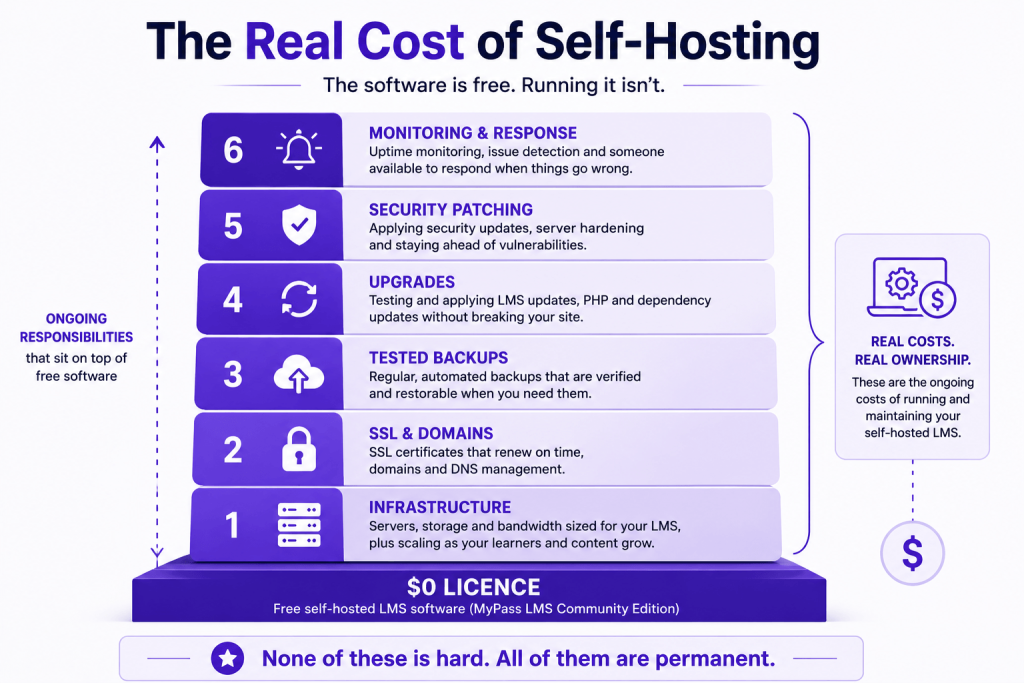
The software being free does not make the operation free. When we talk to teams considering the Community Edition, we walk them through the same list, because a self-hosting decision made without it tends to get reversed six months later, angrily.
- Infrastructure. A VM sized for an LMS with real course content, meaning video, SCORM packages and concurrent learners, plus storage that grows with your library, plus bandwidth. Modest for a small deployment, a real monthly bill at scale.
- SSL and domain management. Certificates that renew on time, every time. One expired certificate during an enrolment period teaches this lesson permanently.
- Backups you have actually tested. A backup you have never restored from is a hope, not a backup. Learner records and continuing education credit history are exactly the data you cannot recreate, and accreditors expect participation records to be retained and produced on demand.
- Upgrades. LMS platforms ship security and feature releases continuously. Somebody has to read the release notes, take a backup, apply the upgrade and check nothing broke, on a schedule rather than whenever they get to it.
- Security. Patching the operating system and the stack underneath the LMS, watching for vulnerabilities and controlling server access. A learning platform holds personal data about every member or employee you train, so it gets treated as a target accordingly.
- Monitoring and the pager. Who finds out your LMS is down, you or your members? Monitoring, alerting and a human who responds are part of the real cost.
The honest summary: none of these items is hard on its own. The cost is that they are permanent. Self-hosting is a standing commitment of some hours every month from someone technical, forever. If those hours exist on your team and are cheap, self-hosting is genuinely economical. That is not a trap, and it is why we built a free edition at all. If those hours do not exist, you will pay for them one way or another, and managed hosting is simply the version where the price is printed on the tin.
What managed hosting includes, and what it does not fix
With MyPass LMS managed hosting, the operational list above becomes ours: infrastructure, SSL, tested backups, monitoring, upgrades and security patching, running on FedRAMP-authorized AWS infrastructure.
Registered users are unlimited on every plan, including the free one. What differs between tiers is capacity rather than licensing:
| Community Edition | Shared Hosting | Private Hosting | Enterprise | |
| Price | Free | $99/mo | $319/mo | Custom |
| Registered users | Unlimited | Unlimited | Unlimited | Unlimited |
| Simultaneous logins | Depends on your server | Up to 50 | Up to 1,000 | Custom |
| Hosting | You manage | Kprise-managed, shared | Kprise-managed, private | Dedicated, high availability |
| SSL and subdomain | You manage | Standard, assigned | Your own | Custom |
| Support | Docs and community | Standard | Priority | Dedicated |
That distinction matters, so it is worth stating directly. Registered users means every learner, admin, instructor and manager account you create, and that is unlimited everywhere. Simultaneous logged-in users means how many people are active at the same moment, which is the real infrastructure measure. An association can have five thousand members in the system with fifty online at once. We price the second thing, never the first.
What managed hosting does not fix: your content, your programme design or your integrations strategy. A badly structured certification programme is badly structured on anyone's servers. If your LMS needs to talk to an association management system, that is a separate decision with its own failure modes, and native AMS integration is included at every paid tier with no separate connector licence, which is where most association LMS quotes hide their real cost.
Who should genuinely self-host
We would rather tell you now than migrate you later. The Community Edition is not for everyone. It is for evaluation, and for teams that operate infrastructure as a matter of course. Self-hosting is the right call when:
- You have standing IT capacity. Not that your treasurer's nephew is technical, but an actual person or team whose job includes running servers, and who will still be there next year.
- Policy requires data on your infrastructure. Some organizations, including government-adjacent and certain international ones, must keep member and training data inside infrastructure they control. Self-hosting is not a preference there, it is a requirement, and it is the use case the Community Edition exists for.
- You are cost-constrained but skill-rich. Small technical teams, developer-heavy organizations, or anyone for whom a spare VM and a few admin hours a month are effectively free. The arithmetic legitimately favours you.
- You want to evaluate deeply before spending anything. Standing up the Community Edition is a zero-licence-cost way to run a real pilot.
Who should choose managed hosting
- Nobody owns servers at your organization. If the honest answer to who patches this in November is silence, the decision is made. Most associations, nonprofits and training businesses are here, and there is no shame in it. You exist to run education programmes, not Linux.
- Your LMS is revenue-critical. If members pay for courses and certifications, downtime means refunds and reputation damage. Someone else's monitoring earns its fee the first bad weekend.
- You are audit-exposed. Continuing education providers and compliance-driven programmes need records that survive and systems that are demonstrably maintained. Our volunteer upgraded it sometimes is a hard sentence to say to an accreditor.
- Your technical person is one person. Single points of failure take holidays and other jobs. A platform only one volunteer understands is a risk dressed as a saving.
If two or more of those describe you, our recommendation is not neutral. Take the 15-day free trial, which is the full platform with no credit card required, and let the self-hosting question answer itself while you evaluate the product.
| If you are a registered nonprofit or a member association, the terms are better and worth asking about: an additional 20 percent off every managed hosting plan, stacking on top of annual billing rather than replacing it, plus a two-month free trial instead of the standard fifteen days. Long enough to run a real member cohort through a course before deciding anything. |
Thinking about Moodle? Read this first
If you are comparing hosting models, you have probably also looked at Moodle, the best-known free and open-source LMS, and the reason many organizations believe self-hosting is the default path. Moodle is a genuinely capable platform with a huge ecosystem, and we built the Community Edition to compete on exactly that axis: free software, unlimited users, your infrastructure.
But talk to anyone who has run Moodle for a few years and you will hear the same arc. The software was free; the operation was not. The person who set it up left. Upgrades got frightening, so they stopped happening. And the eventual fix was paying someone to host and maintain it anyway, at which point free had quietly become a hosting contract plus years of accumulated staff time.
That arc is not a Moodle flaw. It is what self-hosting costs when the organization is not staffed for it, and it applies to our Community Edition exactly as much as it applies to Moodle. The difference is what the exit looks like. With MyPass LMS, the managed plans are the same platform, run by the people who build it, at a published price, rather than a re-implementation onto different software or a services contract you have to scope. Evaluate free, self-host if you are equipped for it, and if you are not, the serious path is one migration away rather than one rebuild away.
The decision in five questions
- Who responds when it goes down on a Saturday? If there is a name, self-hosting is viable. If there is a shrug, it is not.
- Is training data required to stay on your infrastructure? If yes, self-host. The decision is made for you.
- Is the LMS attached to revenue or accreditation? The more yes, the more managed.
- Will the person who sets it up still be there in two years? Institutional memory is an infrastructure component.
- What does an hour of your technical staff's time actually cost? Multiply by a handful of hours a month, forever, and compare it with 99 dollars. Whichever number is smaller is your answer.
Can you switch later? Yes, in both directions
This is the question that should lower the stakes of the whole decision. Because the Community Edition and our hosted plans run the same platform, moving between them is a migration of data rather than a re-implementation: courses, learner records and completion history come along. Organizations start self-hosted and move to managed when the volunteer who ran it moves on, and managed customers with growing IT teams can take it in-house. Choose for the organization you are this year, not the one you might be in five.
The bottom line
Self-hosted versus managed hosting is a staffing decision dressed as a technical one. Self-hosting gives you zero licence cost and complete data control in exchange for permanent responsibility for infrastructure, security, upgrades and backups. Managed hosting hands that responsibility to the vendor for a published monthly price. If you have a capable server administrator with genuine capacity, self-host and we will help you do it. If you do not, managed hosting is the cheaper option once staff time is counted honestly.
Compare the plans, start a 15-day free trial with no credit card, or join the Community Edition preview.
Frequently asked questions
Is a self-hosted LMS really free?
The MyPass LMS Community Edition has no licence fee and no user limits, with unlimited registered users, the same as paid plans. What it does not include is the operation: your infrastructure, your backups, your upgrades and your time. For a team with existing IT capacity that can be nearly free. For a team without it, the honest total cost is your staff hours.
How much do managed LMS hosting services cost?
With MyPass LMS, Shared Hosting is 99 dollars a month on shared infrastructure with up to 50 simultaneous logins, and Private Hosting is 319 dollars a month for a dedicated environment with your own SSL and subdomain and up to 1,000 simultaneous logins. Annual billing saves up to 22 percent. Both include unlimited registered users and start with a 15-day free trial, no credit card required.
What does unlimited registered users actually mean?
It means you can create as many learner, admin, instructor and manager accounts as your organization needs, on every plan including the free Community Edition. Hosted plans are priced on infrastructure model, support level and simultaneous logged-in capacity, never on how many people you register.
What is the difference between the Community Edition and a free trial?
They are different things. The Community Edition is permanently free and self-hosted, and is currently in private preview by waitlist. The 15-day free trial is the full managed platform hosted by us, so you can evaluate without installing anything. If you are technical, trial the managed version first anyway, since it is the fastest way to evaluate the product before deciding where to run it.
How does the MyPass LMS Community Edition compare to Moodle?
Both are free to run on your own infrastructure with no per-user licence fees, and both carry the same true operational cost: your servers, backups, upgrades and staff time. The differences are in what surrounds the free software. MyPass LMS includes the association and certification feature set natively, including continuing education credit tracking, certification workflows and AMS integration with iMIS, Nimble AMS, MemberClicks, Fonteva, NetForum, YourMembership, GrowthZone and Personify, where Moodle typically reaches those through plugins and customization.
Is there nonprofit or association pricing?
Yes. Registered nonprofits and member associations receive an additional 20 percent off every managed hosting plan, stacking on top of annual billing rather than replacing it, plus a two-month free trial instead of the standard fifteen days. Native AMS integration is included at every paid tier with no separate connector licence.
What happens if we outgrow our hosting plan?
Capacity is measured in simultaneous logged-in users, not registered accounts. If usage grows beyond Shared Hosting's 50 simultaneous logins, you can move to Private Hosting at up to 1,000. Beyond that, an Enterprise setup adds additional infrastructure, load balancing and high availability.