
MyPass LMS includes a native SCORM authoring tool, so you can build SCORM-compliant courses directly inside the LMS rather than in a separate authoring application that you then export and upload. This removes the extra software subscription, the export and import step, and the version-mismatch problems that come from maintaining course source files in one tool and the published output in another.
The usual authoring workflow, and where it wastes time
In most LMS setups, building a course and delivering it are two separate jobs handled by two separate pieces of software. You build the course in a dedicated authoring tool, publish it as a SCORM package, then upload that package into your LMS. It works, but it adds a subscription, a file to manage, and a round trip every time you want to make an edit: open the authoring tool, change the content, republish, re-upload, and hope nothing broke in the process.
MyPass folds authoring directly into the platform. You build the course where it lives, which removes the export step and the extra tool entirely.
What built-in SCORM authoring includes
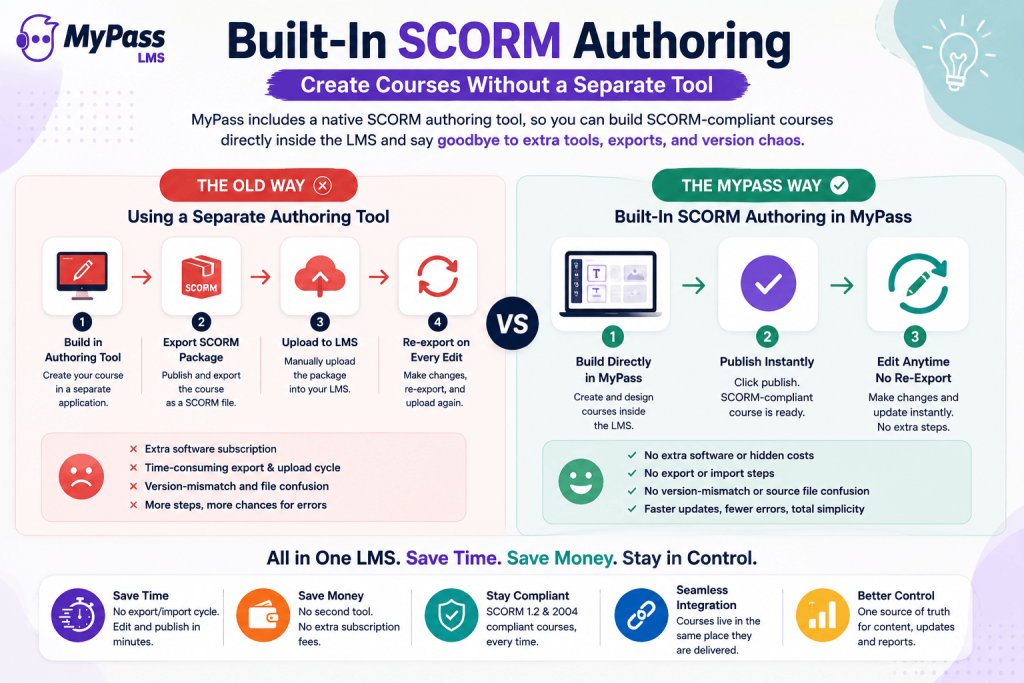
- Course building inside the LMS, so there is no separate application to license, learn or maintain.
- SCORM-compliant output, meaning courses built in MyPass work the same way any standard SCORM course does for tracking and reporting.
- No export or import step. Publish directly, and edit later without republishing and re-uploading a package.
- Support for both SCORM 1.2 and SCORM 2004, so content built or imported into MyPass works with the version your other systems expect.
- The ability to still import existing SCORM content you already own, alongside what you build natively.
What this actually saves
Removing the separate authoring tool changes more than the subscription line. It removes:
- The cost of a second software license dedicated purely to authoring.
- The export and upload cycle every time a course needs an edit, which is often more frequent than teams expect once a course is live.
- Version confusion between the authoring source file and what is actually published in the LMS.
- The training overhead of teaching content creators a second tool with its own interface and quirks.
| → The time saved is not just in building the first version of a course. It is in every small edit afterward, since a typo fix or an updated policy reference no longer means a full export and re-upload cycle. |
Who this is for
Native SCORM authoring benefits any organization creating its own content, but it matters most for teams that edit courses frequently, such as compliance content that changes when policy changes, or teams without a dedicated instructional designer who would otherwise need to learn a separate specialized tool. It also matters for organizations using our AI course builder, since a generated course is already inside the authoring environment and ready to refine without ever leaving the platform.
The bottom line
Built-in SCORM authoring removes a whole category of friction from course creation: the separate tool, the export step, and the version mismatches that come from maintaining content in two places. Whether you are building from scratch or refining an AI-generated draft, MyPass LMS keeps authoring and delivery in one platform, so a course is always ready to publish and edit without leaving the system.
See the full course creation toolkit, try the AI course builder, or start a free trial and build your first course directly in MyPass LMS.
Frequently Asked Questions
Does MyPass LMS include a SCORM authoring tool?
Yes. MyPass includes native SCORM authoring built into the platform, so you can create SCORM-compliant courses directly, without a separate authoring application or an export and upload step.
Do I still need a separate authoring tool with MyPass?
No, for most course creation you do not. MyPass's built-in authoring covers building, publishing and editing courses natively. You can still import existing SCORM content you already own if you have it.
What SCORM versions does MyPass support?
MyPass LMS supports both SCORM 1.2 and SCORM 2004, so content built natively or imported into the platform works correctly for tracking and reporting.
What's the benefit of built-in authoring over a separate tool?
It removes the extra software subscription, the export and re-upload cycle every time you edit a course, and the version confusion between a source file and the published package. Edits become immediate rather than a multi-step process.
Can I edit a course after publishing it in MyPass?
Yes. Because authoring is built into the platform, you can edit a published course directly and republish instantly, without exporting a new SCORM package and re-uploading it.