
An LMS, or learning management system, is software that delivers, tracks and manages training and education in one place. It lets organizations create or upload courses, assign them to learners, track completion and results, and store training records, replacing the spreadsheets, emails and scattered files that manual training relies on. LMS platforms are used for employee training, compliance, customer education, certification and more.
The simplest definition, then the useful one
An LMS, or learning management system, is software for delivering and tracking training. That is the one sentence version. The useful version is this: an LMS is what replaces the tangle of spreadsheets, email reminders, shared drives and manual record keeping that training turns into the moment you have more than a handful of people to train.
If you have ever tried to track who completed a mandatory course by maintaining a spreadsheet and chasing people by email, you have felt the problem an LMS solves. It takes the four things that make training work at scale, which are delivery, assignment, tracking and record keeping, and puts them in one system that does the administrative work for you.
How an LMS actually works
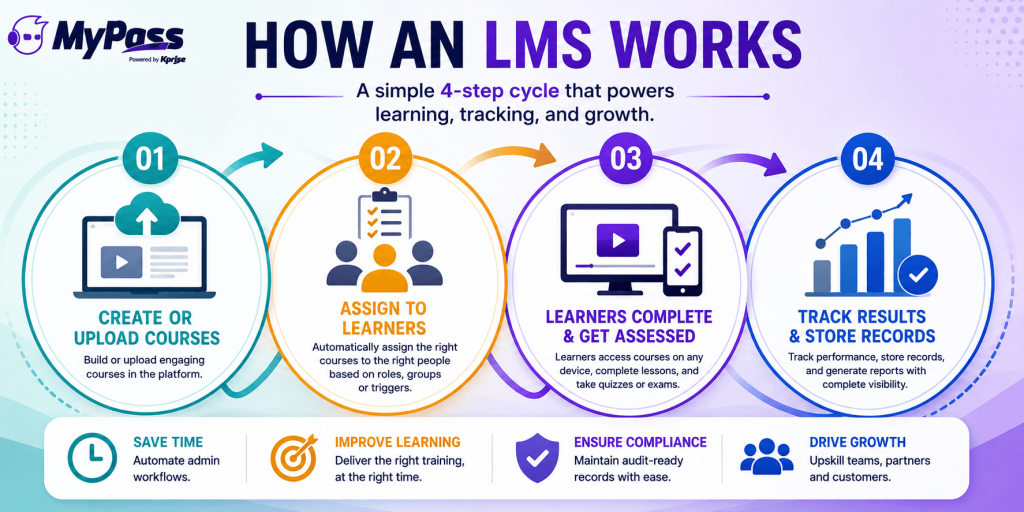
At its core, every LMS runs the same loop:
- Create or upload content. Build courses in the platform, or upload existing material including standardized SCORM and xAPI packages.
- Assign to learners. Give the right courses to the right people, ideally automatically based on role, department or team rather than one by one.
- Learners complete and get assessed. People take courses on any device, at their own pace, with quizzes or exams to confirm they learned it.
- Track and record. The LMS records who completed what, when, and how they scored, storing it as a permanent, reportable record.
That loop is the whole value. The LMS handles the assigning, reminding, tracking and record keeping that would otherwise eat an administrator's week.
Key features to expect
LMS platforms vary, but the features that matter most for most organizations are consistent:
- Course creation and content management, including authoring tools and support for uploaded content
- Automated enrollment and assignment by role, group or trigger, not manual lists
- Progress and completion tracking with real-time visibility into who has done what
- Assessments and certifications, including quizzes, exams and issuing credentials
- Reporting and audit trails, the records that prove compliance training happened.
- Integrations that connect to your HR system, AMS or other tools so data flows automatically
| → The features that separate a great LMS from a basic one usually are not the flashy ones. They are automation, meaning does it assign and remind by itself, and integration, meaning does it talk to your other systems or create a new data silo. |
Who needs an LMS, and what they use it for
An LMS is not just for one type of organization. The same core software serves very different needs:
- Employee training and onboarding, getting new hires productive and skilling up existing staff
- Compliance training, mandatory courses with the tracking and audit trails regulators require
- Customer education, teaching customers to use your product, which reduces churn and support load
- Partner and channel training, enabling resellers and partners at scale
- Certification and continuing education, issuing and tracking credentials, common for associations and certification bodies.
- Sales enablement, training reps to sell more effectively
The common thread is simple. Any time you need to deliver training to a group and prove it happened, an LMS is the tool. The main differences between platforms come down to pricing model, ease of use, and how much they include versus charge extra for, which is worth understanding before you choose one.
The bottom line
An LMS is software that delivers, tracks and manages training in one place, replacing the spreadsheets and manual chasing that do not scale. It runs a simple loop of create, assign, complete and track, and the best platforms automate the admin and integrate with your other systems rather than becoming another silo. Whether it is employee training, compliance, customer education or certification, the job is the same: deliver training and prove it happened.
MyPass LMS does all of this in one connected platform, including course authoring, automated assignment, tracking, certifications, compliance audit trails and integrations, with unlimited registered users and no per-seat fees. See how it works, or start a free trial.
Frequently Asked Questions
What is an LMS?
An LMS (learning management system) is software that delivers, tracks and manages training in one place. It lets organizations create or upload courses, assign them to learners, track completion and results, and store training records.
How does an LMS work?
An LMS runs a simple loop: you create or upload courses, assign them to learners (ideally automatically by role), learners complete and are assessed, and the platform tracks results and stores permanent records, handling the admin that manual training cannot scale.
What is an LMS used for?
Employee training and onboarding, compliance training, customer education, partner training, certification and continuing education, and sales enablement. Any time you deliver training to a group and need to prove it happened, an LMS is the tool.
What features should an LMS have?
Course creation and content management, automated enrollment, progress and completion tracking, assessments and certifications, reporting and audit trails, and integrations with your other systems. Automation and integration matter most.
Do small businesses need an LMS?
Once you are training more than a handful of people, yes. An LMS automates assignment, tracking and record keeping that would otherwise be managed through spreadsheets and email, which does not scale even for small teams.