
Moodle powers around 300 million users with the largest plugin ecosystem in the market and a 20-year community. It remains the right pick for organizations with genuine technical capacity and complex customisation needs. MyPass LMS wins on native association and certification features, a managed upgrade path on the same platform, and lower operational burden for teams without a dedicated administrator.
Two capable platforms, different assumptions
This comparison is written by a vendor that ships both a free self-hostable Community Edition and managed hosting, so we compete directly with Moodle. That also means we know exactly where Moodle is the better pick, and this page says so.
Moodle is genuinely excellent, particularly for higher education and organizations with dedicated technical capacity. It is also not the right pick for every organization that lands on it because it is free. This comparison covers where each fits.
Where Moodle genuinely wins
- You have standing technical capacity. A dedicated administrator or a certified Moodle Partner is the assumption Moodle is designed around, and it works well when that holds.
- You need the deepest ecosystem in the market. More than 2,000 plugins and 20 years of community-contributed extensions. Unmatched.
- You are in higher education. Moodle's roots and feature set fit university teaching and assessment particularly well.
- You need extensive customisation that goes beyond what any commercial platform offers out of the box.
- You value the global community. Moodle has active user groups, contributors and events worldwide.
| One honest caveat from independent reviews: the interface has aged and configuration options are extensive without always being logically organized. Recent versions have improved, but a first-time administrator still faces a real learning curve. |
Where MyPass LMS wins
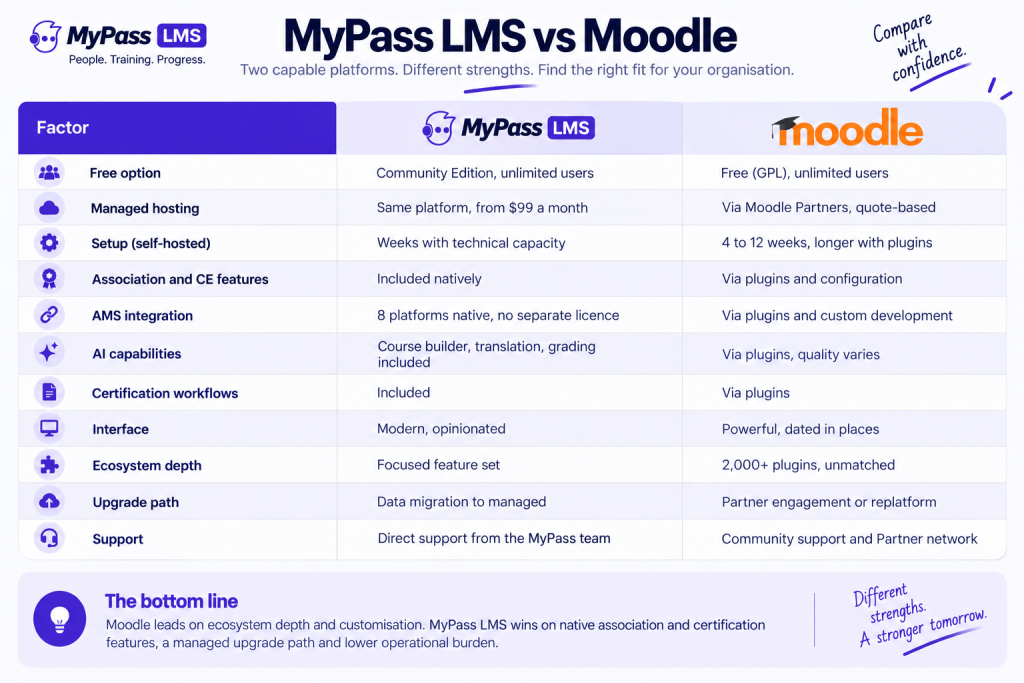
| Factor | MyPass LMS | Moodle |
| Free option | Community Edition, unlimited users | Free (GPL), unlimited users |
| Managed hosting | Same platform, from 99 dollars a month | Via Moodle Partners, quote-based |
| Setup (self-hosted) | Weeks with technical capacity | 4 to 12 weeks, longer with plugins |
| Association and CE features | Included natively | Via plugins and configuration |
| AMS integration | 8 platforms native, no separate licence | Via plugins and custom development |
| AI capabilities | Course builder, translation, grading included | Via plugins, quality varies |
| Certification workflows | Included | Via plugins |
| Interface | Modern, opinionated | Powerful, dated in places |
| Ecosystem depth | Focused feature set | 2,000+ plugins, unmatched |
| Upgrade path | Data migration to managed | Partner engagement or replatform |
Three differences drive most decisions:
- The association and certification feature set is native in MyPass LMS. In Moodle it typically arrives through plugins whose quality, maintenance and compatibility with future versions vary.
- The managed upgrade path. With Moodle, moving from self-hosted to managed means engaging a Partner or replatforming. With MyPass LMS, the managed plans run the same software.
- AI is included rather than plugin-dependent. Course generation, translation across 120-plus languages and AI-assisted grading arrive in the platform rather than through third-party extensions.
The honest picture on 'free'
Both are free at the licence level, and both cost real money to run:
- Moodle self-hosted. Free licence, unlimited users. Realistic total cost runs into low thousands annually plus 180 to 300 hours of staff time.
- MyPass LMS Community Edition. Free licence, unlimited registered users. Similar self-hosting cost profile.
- The difference: your exit. If you outgrow self-hosting, MyPass LMS managed hosting starts at 99 dollars a month on the same platform. Moodle Partner managed hosting is quote-based and varies with your configuration.
Where the choice usually gets made
- Do you need native association and certification features? If yes, MyPass LMS ships them; on Moodle you assemble them from plugins.
- Do you have or want long-term technical capacity? If yes, Moodle's ecosystem is a genuine advantage. If your capacity is fragile, the managed upgrade path matters more.
Everything else is smaller than these two questions. Interface preferences, AI differences and integration counts matter but rarely change the answer once those two are settled.
The bottom line
Moodle and MyPass LMS are both genuine free options with unlimited users, and both cost real money to run. Moodle earns its position with the largest ecosystem in the market and 20 years of community. MyPass LMS wins where association and certification features matter, where the managed upgrade path matters, and where you want AI included rather than assembled. Choose by your capacity today and your likely capacity in three years.
Join the Community Edition waitlist, compare the managed plans, or read the wider Moodle alternatives comparison.
Frequently asked questions
Is MyPass LMS a Moodle alternative?
Yes. Both offer a free self-hostable option with unlimited users. MyPass LMS ships association, certification and AI features natively where Moodle reaches them through plugins, and the managed upgrade path runs on the same platform.
Is Moodle really free?
The licence is free under the GPL with no per-user fees. Running it costs infrastructure and staff time: realistic TCO for a serious deployment runs into low thousands annually plus 180 to 300 hours of staff time.
What does MyPass LMS do better than Moodle?
Native association and certification features, native AMS integration with eight platforms, AI course generation and translation included, a managed upgrade path on the same platform, and a more modern interface.
What does Moodle do better than MyPass LMS?
Ecosystem depth with 2,000-plus plugins, higher education fit, extensive customisation flexibility, and a global community of users and contributors that is unmatched.
Can I migrate from Moodle to MyPass LMS?
Yes. SCORM content transfers cleanly; historical records and Moodle-specific plugin configurations require mapping and rebuilding, which is the standard pattern for any Moodle exit.