
MyPass LMS records every course completion as a dated, tamper-evident entry in an immutable audit trail, and lets you generate a filtered, audit-ready report in one click, by person, department, course or date range. There is no export-and-reconcile process. The report reflects the same record an auditor or regulator would ask for, produced on demand rather than assembled after the request comes in.
The moment this feature actually matters
Nobody thinks about audit reporting until the day someone asks for it. A regulator opens an inquiry, a board member asks a pointed question after an incident, or an insurance renewal requires proof of compliance training. In that moment, the difference between a platform with a real audit trail and one without becomes very expensive very quickly.
We built one-click audit reporting because the worst time to discover your training records are incomplete is during an actual audit. MyPass is designed so the answer to show me the proof is always a few seconds away, not a multi-day scramble through old exports.
What gets recorded, and how
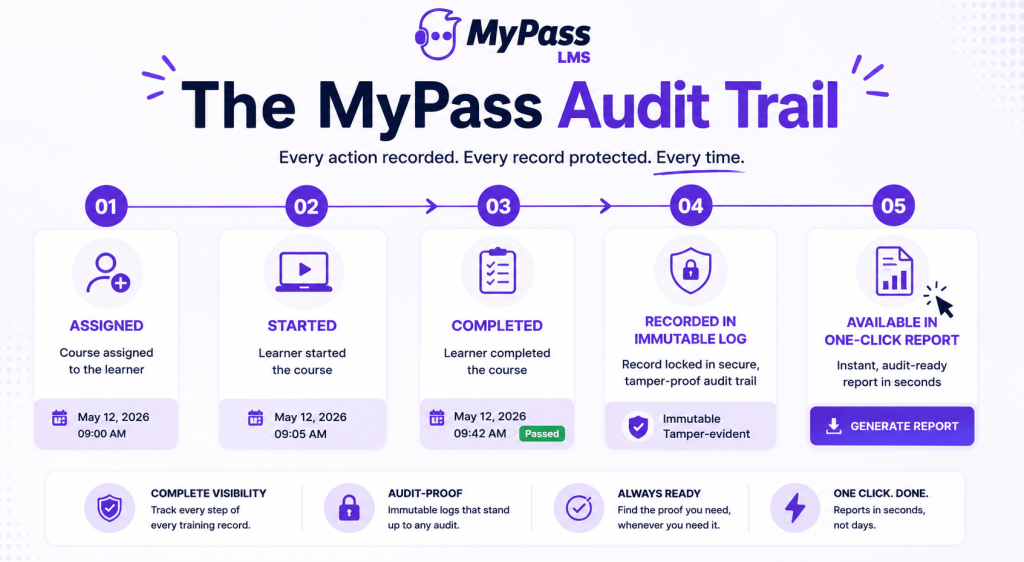
Every meaningful event in a course's lifecycle is captured automatically, with no manual entry required:
- When a course is assigned to a person, and by what rule, such as role or location based automatic assignment
- When they start it and when they complete it, with an accurate timestamp
- The result, including pass, fail or score, for assessed content
- Certification issuance and expiry dates, where relevant
- All of this stored in an immutable log, meaning entries cannot be quietly altered after the fact
Because this happens automatically as part of normal course delivery, there is nothing extra to configure or remember. The audit trail exists simply because training happened on the platform.
How the one-click report actually works
When you need documentation, whether for a regulator, an internal audit, or a board request, the report is generated directly from that same immutable log:
- Filter by person, department, course, date range, or any combination.
- Generate the report instantly, reflecting the actual recorded data, not a reconstruction from memory or scattered files.
- Export it in a format ready to hand to an auditor or regulator.
- Re-run the same query later and get a consistent answer, since the underlying record does not change.
| → The test we designed this feature to pass: if someone asks for proof that a specific employee completed a specific course on a specific date, the answer should take under a minute, not a day of digging. |
Why this matters more than course content, in an audit
It is worth saying plainly: in an actual audit, the quality of your training content rarely comes up. What gets scrutinized is whether you can prove the right people completed the right training at the right time. That is a documentation question, not a content question, and it is exactly what compliance training programs live or die on.
This is also why the audit trail sits underneath every part of MyPass LMS rather than being a separate module. Compliance course , certifications, and any custom training you build all feed the same immutable record, so the one-click report covers your entire training program, not just a subset of it.
The bottom line
One-click audit reporting exists because the moment you need proof of training is never a convenient one. MyPass LMS records every completion automatically in an immutable audit trail and turns that record into a filtered, ready-to-hand-over report in one click, whether the request comes from a regulator, an internal audit, or your own board. The documentation is always current, because it was never assembled after the fact in the first place.
See the full compliance solution, read the complete guide to compliance training, or start a free trial and see your first audit-ready report in minutes.
Frequently Asked Questions
What is a one-click audit report?
A one-click audit report is a filtered, ready-to-export record of training completions, generated instantly from MyPass's LMS immutable audit trail. You filter by person, department, course or date range and get an audit-ready document without manually assembling data.
What information does the MyPass audit trail record?
It records when a course was assigned and by what rule, when it was started and completed, assessment results, and certification issuance and expiry dates, all stored as tamper-evident, dated entries.
Why is an immutable audit trail important?
Because in an audit or investigation, what matters most is proof that specific training happened for specific people on specific dates. An immutable record cannot be altered after the fact, which is what makes it defensible to a regulator.
Do I need to set anything up to get audit-ready reporting?
No. The audit trail is recorded automatically as part of normal course delivery on MyPass LMS. There is no separate configuration required, and the one-click report is available whenever you need it.
Does the audit trail cover all training, or just compliance courses?
It covers everything delivered through MyPass LMS, including compliance courses, certifications, and any custom training you build, so a single report can reflect your entire training program rather than one subset of it.