
Accessible e-learning means courses that people with disabilities can use fully, including those who rely on screen readers, captions or keyboard navigation. You achieve it by following WCAG principles: add captions and transcripts, write descriptive alt text, ensure keyboard access and strong colour contrast, and structure content clearly. It is often a legal requirement too.
Why Accessibility Is Not Optional
When you build training, it is easy to design for people who see, hear and navigate exactly as you do. But a meaningful share of any workforce has a disability, some visible, many not, and training that ignores them either excludes people or breaks the law. Accessible e-learning means designing courses that everyone can use, including people who rely on screen readers, captions, keyboard navigation or other assistive technology.
There are two reasons this matters. The first is fairness: every employee has a right to the training their job depends on. The second is legal: in many regions, frameworks such as the ADA and equivalent laws require that digital content, including training, be accessible. Inaccessible mandatory training is a compliance risk as real as any other.
| This is general information, not legal advice. Accessibility obligations vary by country, sector and organization. Confirm your specific requirements with a qualified professional, and treat WCAG as the practical standard most regulations point to. |
The WCAG Basics, in Plain English
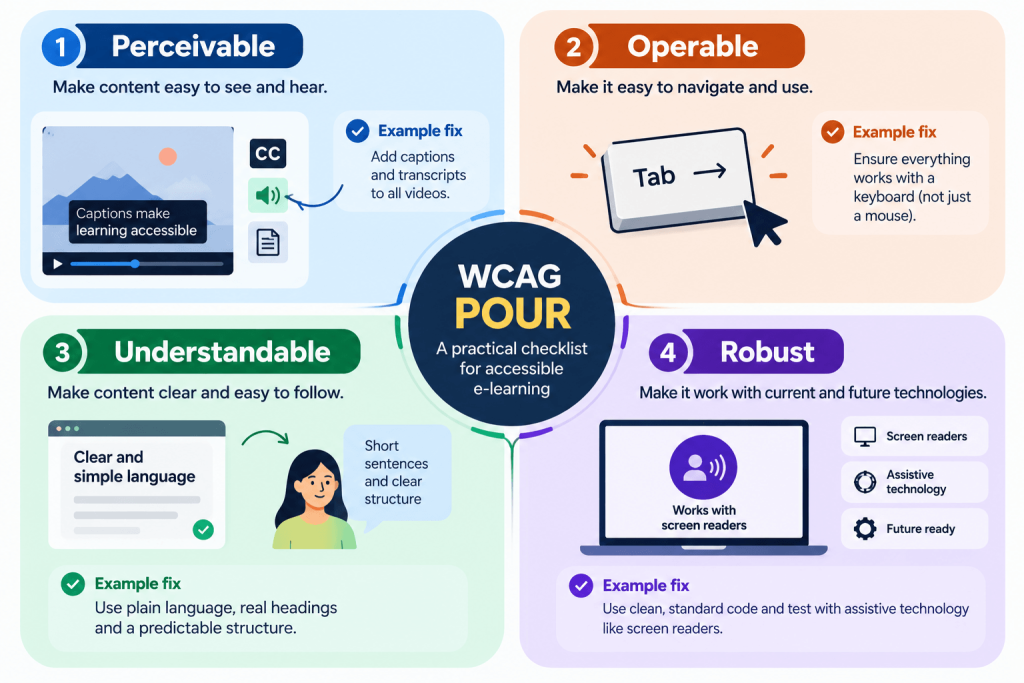
The Web Content Accessibility Guidelines (WCAG) are the widely accepted standard for digital accessibility, and most accessibility laws point to them. WCAG is organized around four principles, easy to remember as POUR, that apply directly to training content.
- Perceivable: people can perceive the content, captions for audio, alt text for images, no meaning carried by colour alone.
- Operable: people can operate it, everything works by keyboard, not just a mouse, with no time traps.
- Understandable: content and navigation are clear, readable language and predictable structure.
- Robust: it works with assistive technology like screen readers, now and as tech changes.
The Practical Fixes That Matter Most
You do not need to become an accessibility expert to make training dramatically more inclusive. A handful of practical fixes cover the most common barriers, and most are quick once you build them into your process.
- Captions and transcripts for every video and audio clip, so deaf and hard-of-hearing learners are included.
- Descriptive alt text for images that carry meaning, so screen readers can convey them.
- Keyboard navigation, every interaction works without a mouse.
- Strong colour contrast and no colour-only cues, so low-vision and colour-blind learners can read and follow.
- Clear structure and plain language, real headings, short sentences, predictable layout.
| Captions are usually the highest-impact single fix, because audio-only content excludes anyone who cannot hear it and also helps learners in noisy or sound-off environments. If you do one thing, caption your videos. |
Build Accessibility In, Do Not Bolt It On
The expensive way to do accessibility is to build courses however is easiest and then retrofit them when someone complains or an audit looms. Reworking finished content, adding captions to dozens of videos, rewriting colour-coded materials, is slow and costly. The cheap way is to design for accessibility from the start.
That means making captions, alt text, contrast and keyboard access part of your standard course-building checklist, not an afterthought. When accessibility is baked into how you create content, each new course is inclusive by default and you avoid the retrofit tax entirely. It also tends to produce clearer, better-structured training for everyone, not only for people using assistive technology.
How MyPass LMS Supports Accessible Training
Accessibility depends on both the platform learners use and the content you put in it. On the platform side, an LMS that works with assistive technology, keyboard navigation and screen readers, means learners can actually reach and move through their training. On the content side, MyPass LMS lets you add captions, transcripts and structured content as part of building the course, so accessibility is part of creation rather than a later scramble.
Because you can standardize how courses are built, you can make accessibility part of your default process, every new course captioned, structured and navigable, rather than depending on whoever built it remembering to check. And because reporting tracks completion for everyone, you can be confident all learners, not just some, can access mandatory training.
| A practical first step: audit your existing mandatory courses for the two most common failures, missing captions and images without alt text. Fixing those two issues alone removes the barriers that exclude the most learners. |
The bottom line
Accessible e-learning is training everyone can actually use, and it is both a matter of fairness and, in many places, a legal requirement. The WCAG POUR principles, perceivable, operable, understandable, robust, give you a clear framework, and a handful of practical fixes (captions, alt text, keyboard access, contrast, clear structure) remove the most common barriers.
Build accessibility in from the start to avoid the retrofit tax and to produce clearer training for everyone. See how captioning, structured content and assistive-technology support come together in MyPass LMS features, read about building an online certification program, or start a free trial. Always confirm your specific legal obligations with a qualified professional.
Frequently asked questions
What is accessible e-learning?
Accessible e-learning means online training that people with disabilities can use fully, including those who rely on screen readers, captions, keyboard navigation or other assistive technology. In practice it involves captions and transcripts for audio and video, descriptive alt text for meaningful images, keyboard operability, strong colour contrast, and clear structure and language. It ensures every learner can access the training their job depends on, rather than excluding some of them.
What is WCAG and how does it apply to training?
WCAG (Web Content Accessibility Guidelines) is the widely accepted standard for digital accessibility, and most accessibility laws point to it. It is built on four principles, perceivable, operable, understandable and robust (POUR). Applied to training, that means content people can perceive (captions, alt text), operate (keyboard access), understand (clear language and structure) and use with assistive technology. Following WCAG is the practical way to make courses both inclusive and compliant.
Is training required to be accessible by law?
In many regions, yes. Frameworks such as the ADA in the United States and equivalent laws elsewhere require that digital content, which includes online training, be accessible to people with disabilities, and inaccessible mandatory training can be a real compliance risk. The exact obligations vary by country, sector and organization, so you should confirm your specific requirements with a qualified professional, but WCAG is the standard most of these laws reference.
How do you make an online course accessible?
Add captions and transcripts to all video and audio, write descriptive alt text for meaningful images, make sure every interaction works by keyboard and not only a mouse, use strong colour contrast and never rely on colour alone to convey meaning, and structure content with real headings, plain language and a predictable layout. Building these into your standard course-creation process, rather than retrofitting later, makes each new course accessible by default and is far cheaper.