
Video-based training delivers learning through recorded or live video instead of text or slides. A video LMS goes beyond hosting the file: it tracks who watched, how much, and whether they passed a check, protects the content from copying, and records completion for compliance. A file host does none of that.
What Video-Based Training Is, and What It Is Not
Video-based training is any learning delivered mainly through video, from a recorded walkthrough or a talking-head explainer to a live virtual session. It works because video shows rather than tells: a procedure, a piece of software, or a physical task is far easier to follow when you can watch it happen.
The mistake organizations make is treating video-based training as a storage problem. They upload clips to a shared drive or a consumer video site and call it training. That delivers the video, but it answers none of the questions training actually has to answer.
- Who was assigned this video, and who actually watched it?
- How much of it did they watch, and did they skip to the end?
- Did they understand it, or just leave it playing?
- Can we prove, for an audit, that a named person completed it on a date?
- Is the content protected, or can anyone download and share it?
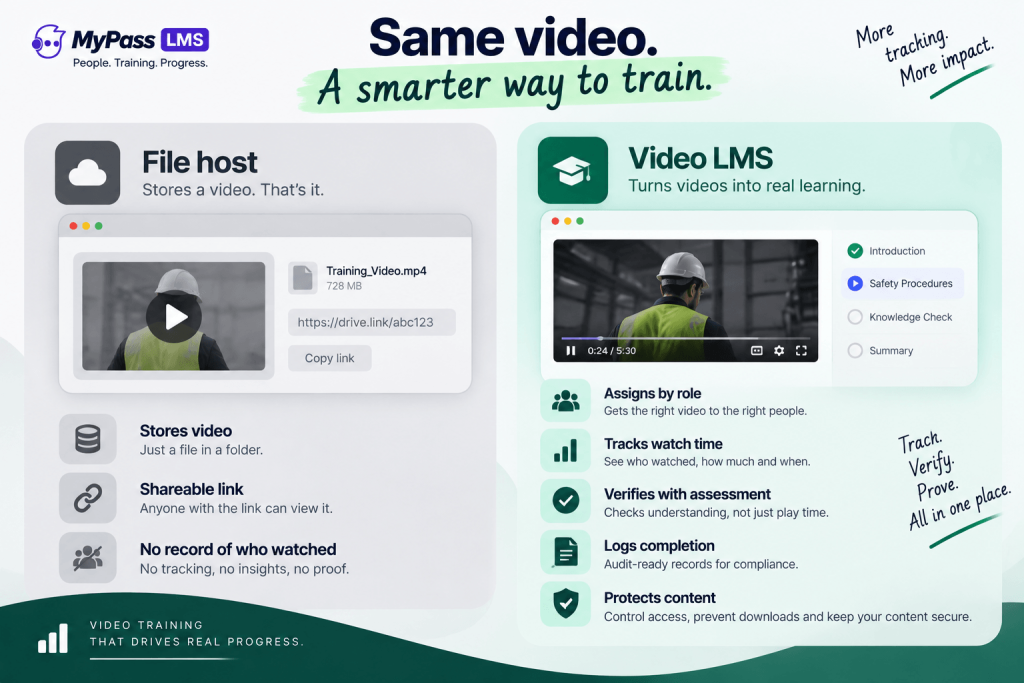
| A shared drive hosts a file. A video LMS delivers training. The difference is everything that happens after the play button: tracking, assessment, proof and protection. |
What a Video LMS Adds
A video LMS is a learning management system that treats video as a first-class content type, with the tracking, assessment and protection that training requires wrapped around it.
- Completion tracking: records who watched, how much, and when, not just who opened the link.
- In-video and follow-up assessment: checks that the learner understood, not just that the video played.
- Assignment and reminders: pushes the video to the right people by role, and chases non-completers automatically.
- Audit-ready records: logs each completion as a dated entry you can produce on demand.
- Content protection: controls who can open the video, on which devices, and whether it can be downloaded.
Why Tracking and Proof Matter
For a lot of training, watching is not the point. Proving the watching happened is the point. Safety, compliance and certification training all have to be defensible: if a regulator or an auditor asks whether a named employee completed a required video on a given date, a link in a shared folder cannot answer that.
A video LMS records every completion as a dated entry in an audit trail, so the answer is a filtered report rather than a scramble through email and drive folders. That is the difference between hoping people watched and being able to show they did.
| If your video training is tied to safety, compliance or certification, hosting alone is a liability. You need the completion record, and you need it to be tamper-evident and easy to export. |
Protecting Training Video
Training video is often expensive to produce and sometimes commercially sensitive, whether it is proprietary process knowledge or paid course content you sell. On a consumer platform or an open drive, anyone with the link can download and reshare it.
This is where content protection matters. Controlling who can open a video, on which devices, and for how long keeps investment and revenue where they belong. MyPass LMS pairs video delivery with digital rights management through MyPass DRM, so sensitive or paid video is protected rather than freely copyable.
| If you sell video courses or your video contains proprietary knowledge, download protection is not optional. Ask any platform you evaluate exactly how it stops a learner saving and resharing the file. |
Video-Based Training in MyPass LMS
MyPass LMS handles video as part of a full learning workflow rather than as isolated files. Video sits inside courses and learning paths, is assigned by role, is tracked for real completion, can be checked with assessments and proctoring where the stakes justify it, and is recorded in the same audit-ready reporting as the rest of your training.
Because it is one platform, the video does not live apart from the record. The same system that plays the video knows who was assigned it, who finished it, and what score they earned, and it can protect and even sell that video without a second tool.
- Deliver recorded and live video inside structured courses and paths.
- Track genuine completion and verify understanding with assessments.
- Protect sensitive or paid video with DRM through MyPass DRM.
- Sell video courses natively, with member and non-member pricing.
- Produce audit-ready completion records for every learner.
The bottom line
Video-based training is one of the most effective ways to teach a procedure, a tool or a task, but the video itself is only half the job. Without tracking you cannot prove it worked, and without protection you cannot keep what you invested in producing it.
A video LMS closes both gaps by wrapping delivery in tracking, assessment, proof and protection. See how video fits alongside courses, assessments and reporting in MyPass LMS features, learn how content protection works, or start a free trial to try it with your own footage.
Frequently asked questions
What is the difference between a video LMS and a video hosting site?
A video hosting site stores and streams the file. A video LMS delivers the video as training: it assigns it to the right people, tracks genuine completion, verifies understanding with assessments, records audit-ready proof, and protects the content from copying. Hosting answers where the file is; an LMS answers whether training happened.
Can you track how much of a video someone actually watched?
In a proper video LMS, yes. It records watch time and progress, not just whether the link was opened, so you can tell the difference between someone who watched a video and someone who left it playing. That distinction matters for any training you need to prove.
Is video-based training effective for compliance?
It can be very effective, because video shows procedures clearly, but only if completion is tracked and provable. Compliance training must be defensible to an auditor, so the video needs to sit in a system that logs who completed it and when, in a record you can export on demand.
How do you stop people downloading training videos?
You need digital rights management, which controls who can open a video, on which devices, and whether it can be saved. MyPass LMS provides this through MyPass DRM, so proprietary or paid video is protected rather than freely downloadable from a link.