
Bulk user onboarding creates many accounts at once from a structured file or a connected system, then assigns training automatically by role and location. It matters because manual enrolment does not degrade gracefully: it works at ten people, becomes tedious at a hundred, and creates compliance gaps at five hundred.
The moments that break manual enrolment
Most organizations set up their LMS during a calm period and enrol people one at a time. That works until one of four things happens:
- A seasonal intake. Retail, hospitality and logistics can double headcount for a quarter, with compliance deadlines running from each person's start date.
- An acquisition or merger, where several hundred people need accounts, correct role mapping and their existing training history reconciled.
- A new site or client contract, where an entire location comes online at once.
- A programme launch to an audience that was never in the system, such as contractors, volunteers or franchise staff.
In each case the failure is not that enrolment is slow. It is that enrolment being slow delays the compliance clock, and the untrained window is documented.
What bulk onboarding actually involves
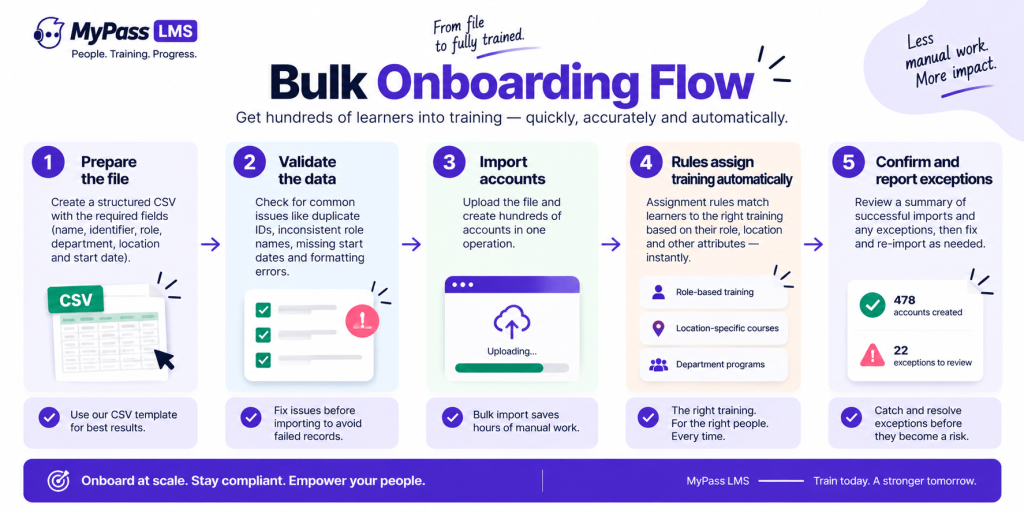
- Prepare a structured file, typically CSV, with the fields the platform needs: name, identifier, role, department, location and start date.
- Validate before importing. Most failed imports are data problems rather than platform problems, which is covered below.
- Import the accounts, creating them in one operation rather than individually.
- Let assignment rules do the rest. This is the part that matters: accounts alone are not useful, and the value comes from role and location rules assigning the right training the moment each account exists.
- Review exceptions. There will be rows that failed or that matched no rule, and finding them immediately is much better than discovering them at an audit.
Why import files fail, and how to prevent it
Almost every unsuccessful bulk import fails for the same handful of reasons, all of which are preventable:
- Inconsistent role or department names. If your file contains 'Sales Assistant', 'Sales assistant' and 'Sales Asst', your assignment rules will match some rows and silently miss others.
- Location recorded inconsistently or missing entirely, which matters enormously when compliance requirements are state-specific.
- Duplicate identifiers, particularly where people appear in multiple source systems.
- Missing start dates, which is a problem because several compliance deadlines run from the start date rather than from account creation.
- Special characters and encoding issues in names, which is common with international workforces and produces corrupted records rather than obvious errors.
| Import a sample of twenty rows first, including your awkward cases, and confirm that the assignment rules fired correctly before importing five hundred. Ten minutes of testing saves an afternoon of remediation and prevents an untraceable batch of half-enrolled accounts. |
Bulk import versus automated provisioning
These solve overlapping problems and are not the same thing.
- Bulk import is for events: an intake, an acquisition, a new site, a one-off audience. It is manual, deliberate and appropriate for a defined batch.
- Automated provisioning is for the ongoing flow, creating accounts from your HR system or association management system as people join, updating them when they move and deactivating them when they leave.
Most organizations need both. Provisioning handles the steady state, and bulk import handles the exceptions that provisioning was not set up for, such as contractors or an acquired population that is not yet in your HR system.
Where unlimited users changes the calculation
Bulk onboarding raises an awkward question under per-seat pricing: do we enrol all four hundred seasonal staff, or only the ones likely to stay?
The compliance answer is all of them, immediately, because deadlines run from each person's start date and the early-tenure period is when incidents are most likely. The budget answer under per-seat pricing is often different, and the gap between those two answers is where compliance failures live.
Because MyPass LMS includes unlimited registered users on every plan, that tension does not arise. Import everyone, keep the record after they leave, and pay for infrastructure capacity rather than headcount.
The bottom line
Manual enrolment does not fail gradually, it fails at exactly the moments that matter most: seasonal intakes, acquisitions and new sites, when compliance deadlines are running from each person's start date. Prepare and validate the data before importing, test with a small sample including your awkward cases, and make sure assignment rules fire automatically so accounts turn into assigned training rather than empty records. Pair bulk import with automated provisioning so the steady state looks after itself.
See the platform features, read about SSO and provisioning, or start a 15-day free trial.
Frequently asked questions
How do you enrol hundreds of learners at once?
Through bulk import, typically from a structured CSV containing name, identifier, role, department, location and start date. Accounts are created in one operation, then assignment rules allocate the correct training automatically based on role and location.
Why do bulk user imports fail?
Almost always data problems rather than platform problems: inconsistent role or department naming, missing or inconsistent location data, duplicate identifiers, missing start dates, and encoding issues in names. Validating and testing a small sample first prevents most failures.
What is the difference between bulk import and user provisioning?
Bulk import handles defined events such as a seasonal intake, an acquisition or a new site. Automated provisioning handles the ongoing flow from a system of record, creating accounts for joiners, updating them for movers and deactivating them for leavers. Most organizations need both.
Why do start dates matter in a bulk import?
Because several compliance deadlines run from the employee's start date rather than from when their account was created. California, for example, requires seasonal and temporary employees to complete harassment training within 30 calendar days of starting.
Should you enrol seasonal staff who may not stay?
For compliance purposes, yes, and immediately, since deadlines run from the start date and the early-tenure window carries the highest risk. Per-seat pricing creates a disincentive to do this, which is why unlimited-user pricing matters for organizations with seasonal hiring.