
Remote and hybrid teams need training that works asynchronously across time zones, replaces the informal learning that happened in offices, and handles compliance obligations that follow each employee's work location rather than your headquarters. Prioritise asynchronous delivery, location-based assignment and strong manager visibility.
Remote training fails differently
When training struggles in an office, the usual causes are time and relevance. Remote and hybrid teams add three problems that office-based programmes never had to solve.
- Informal learning disappeared. A large share of workplace learning was always incidental: overhearing a colleague handle a call, asking the person next to you, watching how something is done. Remote work removes that channel, and formal training has to carry more of the load than it used to.
- Time zones break synchronous delivery. A live session convenient for headquarters is unreasonable somewhere else, and recorded sessions with no interaction complete poorly.
- Compliance follows the employee, not the office. This is the one that catches organizations out, and it is covered below.
The multi-state compliance trap
If you employ people remotely across state lines, your training obligations are determined by where each employee works, not where your company is registered.
So a company headquartered in Texas with no state harassment training mandate, employing remote staff in New York, Illinois and California, inherits three separate mandates: annual interactive training in New York, annual training in Illinois, and biennial training with role-specific durations in California. The requirements differ by state in frequency, duration and content.
| The practical implication: your LMS needs to assign training by the employee's work location as a data field, not by your organizational default. If location is not captured accurately in your HR system, you cannot get this right no matter how good the platform is. |
This gets more complicated with employees who relocate, which remote work makes common. A move from Texas to California creates a new obligation with a deadline, and nobody is likely to flag it unless the system does.
What to prioritise for distributed teams
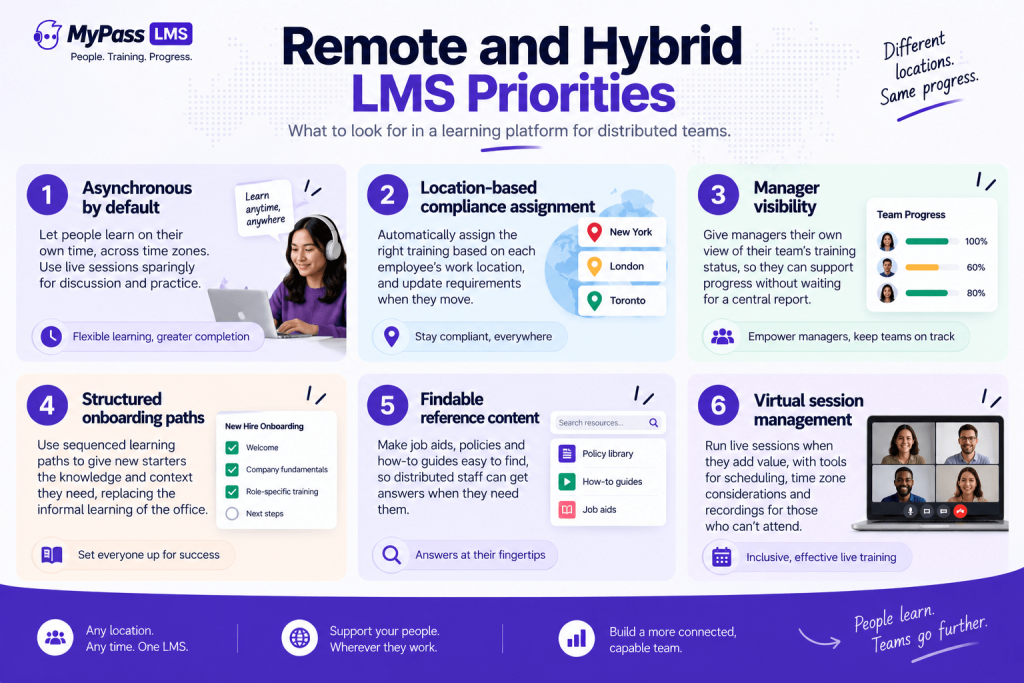
- Asynchronous by default. Anything requiring simultaneous attendance excludes someone. Use live sessions deliberately and sparingly, for discussion and practice rather than information delivery.
- Location-based assignment, so compliance obligations follow each employee's actual work location and update when they move.
- Manager visibility. Remote managers cannot see who has and has not completed training by walking past a desk, so they need their own view of their team's status rather than waiting for a central report.
- Structured onboarding paths. Remote onboarding is where the loss of informal learning hurts most, because a new starter cannot absorb context by proximity. A sequenced path substitutes deliberate structure for accidental exposure.
- Findable reference content. Distributed staff cannot ask the person next to them, so searchable job aids do work that colleagues used to do.
- Virtual session management where live training is genuinely needed, including scheduling and attendance capture rather than a calendar invite and hope.
How the options compare
An honest read. [General 2026 market positioning; confirm current capability and pricing with vendors.]
- TalentLMS. Straightforward to run for a small distributed team, with published pricing. Active-user brackets mean cost steps up as the team grows, and compliance depth across multiple states is not its focus.
- Docebo and enterprise platforms. Strong for large distributed organizations with administrators, good analytics, quote-based pricing and a configuration-heavy setup that suits teams with dedicated capacity.
- Collaboration-first learning tools. Several platforms surface learning inside tools people already use, which genuinely helps engagement for distributed teams. They are often lighter on formal compliance records and certification, which matters if you carry multi-state obligations.
- MyPass LMS. Role and location based automatic assignment, renewal tracking across differing state cycles, unlimited registered users, and virtual session management with attendance capture, all included rather than tiered.
Making remote training actually land
- Keep units short. Remote workers are in more meetings, not fewer, and completion tracks unit length closely.
- Give managers a specific role. Manager endorsement moves participation more than centrally issued reminders, and remote managers need prompting to play that role because they cannot see the gap.
- Replace hallway learning explicitly. Document the things people used to learn by asking, and make them searchable. This is unglamorous and disproportionately valuable.
- Use live time for what only live time can do: practice, discussion, difficult conversations and questions. Recording a presentation and calling it a session wastes the one channel where interaction is possible.
- Track by location from day one, so the compliance matrix is right before it becomes a problem rather than after an audit.
The bottom line
Remote and hybrid training has to do more work than office training did, because the informal learning channel is gone and compliance obligations now follow each employee's location rather than your headquarters. Prioritise asynchronous delivery, location-based assignment that updates when people move, manager visibility, and structured onboarding paths that substitute deliberate sequence for accidental exposure. Then keep units short and reserve live sessions for the things that genuinely need to be live.
MyPass LMS assigns by role and location, tracks differing state renewal cycles, and includes unlimited registered users. See the platform features, or start a 15-day free trial.
Frequently asked questions
What is the best LMS for remote teams?
One that works asynchronously across time zones, assigns compliance training by each employee's work location rather than your headquarters, gives managers visibility of their own team's status, and supports structured onboarding paths that replace the informal learning remote work removes.
Do remote employees follow their own state's training laws?
Generally yes. Training obligations typically follow where the employee works rather than where the company is registered, so a company in a state with no mandate can inherit obligations from New York, Illinois or California through remote staff located there.
What happens when a remote employee relocates?
Their compliance obligations may change, potentially creating a new requirement with its own deadline. This is a common gap, since relocations rarely trigger a training review unless the system assigns by location automatically and updates when the record changes.
How do you onboard remote employees effectively?
With a structured, sequenced onboarding path delivered over the first weeks rather than a single day of content. Remote starters cannot absorb context by proximity, so the structure has to be deliberate, and manager check-ins need to be scheduled rather than incidental.
Should remote training be live or asynchronous?
Asynchronous by default, since any synchronous session excludes someone across time zones. Reserve live time for what genuinely requires interaction, such as practice, discussion and questions, rather than using it to deliver information that could be a short module.