
| Employee training tracking is the process of recording who has completed which training, when, and whether it is current. The three main methods are spreadsheets, in the form of a training matrix, dedicated training-tracking software, and a full LMS. A training matrix works for small teams, but once training is mandatory or headcount grows, an LMS that tracks completion automatically becomes essential for accuracy and audit-readiness. |
Why training tracking quietly becomes a problem
Training tracking starts simple. You have a handful of people and a few courses, so you keep a spreadsheet. It works right up until it does not. Someone leaves, someone joins, a certification expires, a new regulation adds a required course, and suddenly the spreadsheet is a week out of date and nobody is quite sure whose harassment training has lapsed.
Want the matrix rather than the description? Download the training tracking matrix (XLSX) — pre-built tabs for roles, courses, due dates, status and an automatic compliance rollup.
The problem is not that spreadsheets are bad. It is that manual tracking degrades silently. It looks fine until the moment you need it to be accurate, such as an audit, an incident, or a board question, and you discover it is not. This guide covers the three ways to track training, a free matrix template to start with, and the signal that it is time to move to something automatic.
Method 1: the training matrix, a free template
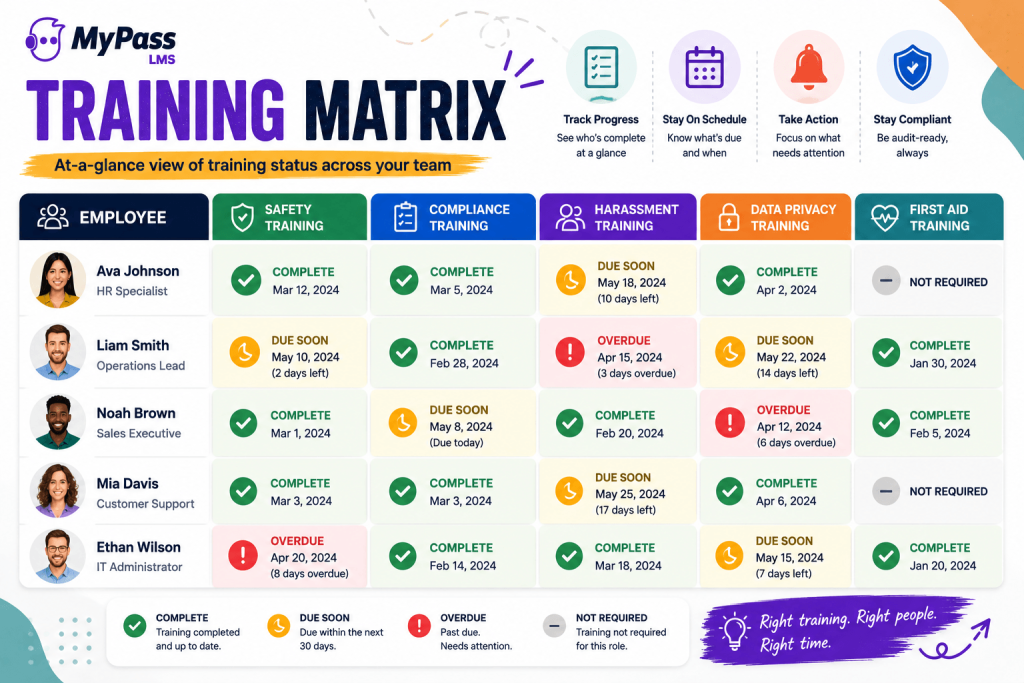
A training matrix is the simplest tracking tool: a grid with employees down one side and required training across the top, and a status in each cell, complete, due, overdue, or not required. It gives you an at-a-glance view of where everyone stands.
To build one, list your people as rows, your required courses as columns, and fill each cell with the completion date or status. Color-code it, green for complete, amber for due soon, red for overdue, and you have a usable dashboard. For a small team with stable, infrequent training, this is genuinely enough.
| → The training matrix is a great starting point and a poor ending point. It works well for 15 people and three courses. It falls apart at 60 people, expiring certifications, and role-based requirements, because keeping it current becomes a job in itself. |
Methods 2 and 3: when to upgrade to software
There are two levels beyond the spreadsheet, and the right one depends on how complex your training is.
- Dedicated training-tracking software. Tools focused specifically on recording and reporting training completion. A step up from spreadsheets, good if you only need tracking and already deliver training elsewhere.
- A full LMS. A learning management system delivers the training and tracks it, one system where assignment, completion and records all live together. This is where most growing organizations end up, because it removes the gap between delivering training and recording it.
The advantage of an LMS for tracking specifically is that completion is recorded automatically the moment someone finishes, with no manual data entry, so no lag and no transcription errors. It assigns training by role, chases non-completers automatically, tracks expiring certifications, and produces reports on demand.
The signals it is time to stop tracking manually
How do you know when you have outgrown the spreadsheet? A few clear signals:
- Your training is mandatory or regulated, so the cost of an inaccurate record is now an audit finding, not an inconvenience.
- You have expiring certifications or recurring training, since manually tracking renewal dates is where spreadsheets fail most often.
- Requirements vary by role or location, meaning a single matrix becomes unmanageable when different people need different things.
- Headcount is growing, so every new person makes manual tracking more fragile.
- You have ever scrambled to reconstruct records for an audit, which is the clearest signal of all.
If any of these describe you, automatic training tracking through an LMS is not a luxury. It is the thing standing between you and a documentation gap you will discover at the worst possible time.
The bottom line
Employee training tracking has three levels: a training matrix for small, simple needs, dedicated tracking software, and a full LMS that delivers and records training together. The matrix is a fine place to start, but the moment your training is mandatory, your certifications expire, or your headcount grows, manual tracking becomes a liability that fails exactly when you need it. Automatic tracking through an LMS removes the lag, the errors and the audit-day scramble.
MyPass LMS tracks training automatically, with completion recorded the instant someone finishes, role-based assignment, expiring-certification alerts, and one-click audit-ready reports, with unlimited users on every plan. See the compliance solution , or start a free trial.
Frequently Asked Questions
What is employee training tracking?
Employee training tracking is the process of recording who has completed which training, when, and whether it is still current. It ensures training obligations are met and provides the documentation needed for audits and compliance.
What is a training matrix?
A training matrix is a grid with employees down one side and required courses across the top, with a completion status in each cell. It gives an at-a-glance view of who has completed what, a simple, effective tool for small teams with stable training needs.
How do I track employee training?
Three methods exist: a training matrix or spreadsheet for small teams, dedicated training-tracking software, or a full LMS that delivers and records training together. An LMS records completion automatically, removing manual data entry and lag.
When should I stop tracking training in a spreadsheet?
When training becomes mandatory or regulated, when you have expiring certifications, when requirements vary by role or location, when headcount grows, or when you have ever scrambled to reconstruct records for an audit. These signal it is time for automatic tracking.
What is the best tool for tracking employee training?
For anything beyond a small, stable team, an LMS is best because it records completion automatically as training is delivered, with no manual entry, no lag, and role-based assignment, renewal tracking and audit-ready reporting built in.
Tracking this in a spreadsheet stops scaling somewhere around fifty people. See how MyPass automates it — automatic enrolment, renewal reminders and audit-ready records.