
Moodle Migration: What Actually Transfers and What You Rebuild
On this page 10 sections
A Moodle course backup only restores into another Moodle. Moving to a different platform means exporting in portable formats instead: SCORM packages, Moodle XML or GIFT for questions, and spreadsheets for grades and users. Native Moodle activities such as lessons, glossaries and databases usually have to be rebuilt.
The Assumption That Breaks the Plan
Almost every Moodle migration starts the same way. Somebody backs up the courses, gets a set of .mbz files, and treats the content problem as solved.
It is not solved, because of one thing that is easy to miss.
Key point
A Moodle course backup is a restore format, not an interchange format. It exists so a Moodle course can be put back into a Moodle. No other platform is built to read one, and there is no documented path to restore one anywhere else.
That is not a criticism of the format. It does its job well. It is only a problem when it is mistaken for a portable archive, which happens constantly, usually at the point where the new platform has already been signed.
| What you have | Pile | How it travels |
| SCORM packages | Moves as-is | The package is a standard zip. Upload it to the new platform. The content survives intact |
| Uploaded files, PDFs, videos | Moves as-is | Download from the course or extract from the backup, then upload |
| Question banks | Moves with work | Export as Moodle XML, which is the format that carries images, or GIFT for plain text. Widely importable |
| Quizzes as a whole | Moves with work | The questions travel. The settings, timing rules, grading method and attempt rules get re-set by hand |
| Grades and completion | Moves with work | Grade export to Excel, OpenDocument, plain text or XML. See the trap below |
| Users and enrolments | Moves with work | Spreadsheet out, spreadsheet in. The mapping is usually easy, the deduplication is not |
| Forums | Mostly rebuilt | Posts can be pulled out as text. Threading, replies and authorship do not survive the move |
| Lessons, glossaries, databases, choices, workshops | Rebuilt | These are Moodle constructs. There is no equivalent in most platforms and no mapping to export them into |
| H5P and plugin-built content | Rebuilt or re-licensed | Depends entirely on the plugin. Assume rebuilt until proven otherwise |
A word on Common Cartridge
Common Cartridge is the standard people reach for once they learn .mbz will not travel, and it helps less than its reputation suggests. The reason is structural rather than a shortcoming of any one platform.
Common Cartridge is a content packaging format. According to 1EdTech, which maintains it, a cartridge carries digital content and multimedia, QTI assessments and question banks, links to external tools via LTI, and metadata. It has no concept of a Moodle lesson, glossary, database, choice or workshop, because those are Moodle constructs rather than things the standard defines. Interactive activities beyond packaged content are only represented as links out to an external tool.
Key point
So a cartridge can carry your pages, files and quiz questions. It cannot carry an activity type that only exists inside Moodle. Run one real export on one real course before building a plan on it, because what you get back is usually less than the word export suggests.
The genuinely portable layer is narrower than most people expect: SCORM, questions, files, and anything you can get into a spreadsheet. If you want the background on why SCORM travels when native activities do not, we covered that in elearning standards.
The Grade Export Trap
This is the one that catches sites that did everything else right, and it is worth checking in the first week rather than the last.
Moodle exports grades as an Excel spreadsheet, an OpenDocument spreadsheet, a plain text file or an XML file. The XML option is the one you want for a clean machine readable record of who completed what.
Key point
XML grade export requires ID numbers to be set on both the users and the activities. Most sites never configured either, because nothing in day to day Moodle use requires it.
If those ID numbers are missing, you are not blocked, but your options narrow in ways that matter.
- You fall back to spreadsheet exports. Readable, but keyed on display names rather than stable identifiers, which makes matching people in the new system a manual job.
- Duplicate and changed names become your problem. Anyone who married, left and returned, or appears twice is now a reconciliation task.
- Activity matching gets fuzzy. Without activity ID numbers you are matching on course and activity titles, which are rarely unique and frequently edited.
The fix is cheap if you do it before the migration and expensive after: set ID numbers on users and on the activities whose completion records you need to keep, then export. Doing it in the wrong order is the single most common avoidable cost in these projects.
Which records you actually have to carry is a separate question, and it is usually narrower than people assume. We set out the retention side in how long to keep training records.
The Ten Minute Check
Before anyone builds a plan, five things tell you most of what the project will cost. None of them takes longer than a few minutes and all of them can be done while you still have options.
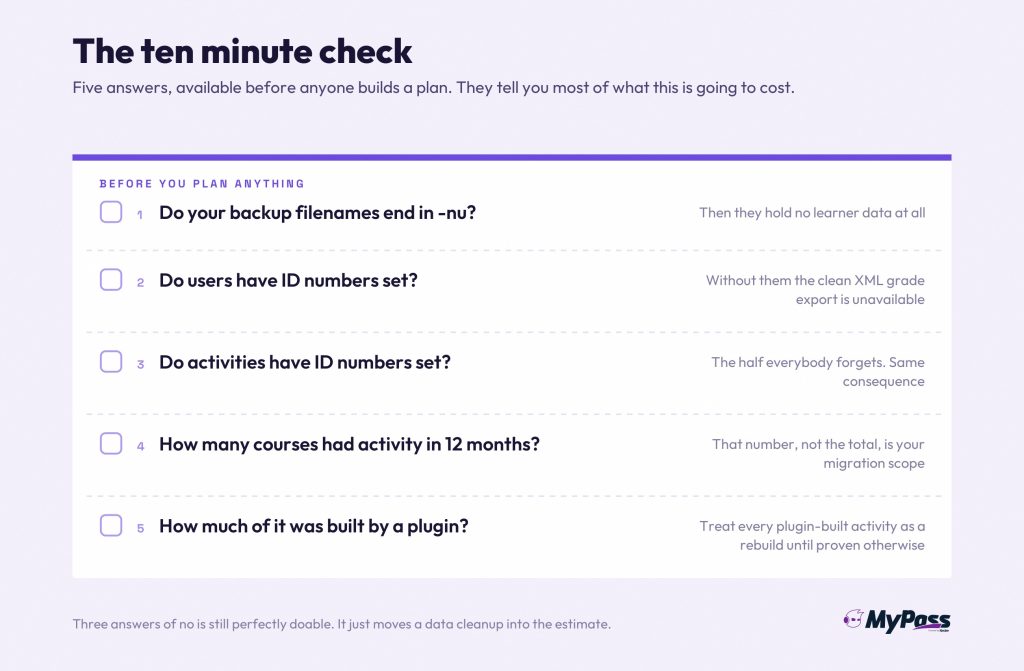
| Check | Where to look | What the answer tells you |
| Do backup filenames end in -nu | Your existing backup files | If yes, those files contain no learner data at all and history has to come from a separate export |
| Do users have ID numbers | A user profile, the optional ID number field | If no, your clean XML grade export is unavailable until somebody populates them |
| Do activities have ID numbers | Common module settings on any graded activity | Same answer, and this is the half people forget |
| How many courses had activity in 12 months | Course or site activity reports | Usually a small fraction of the total. This number is your real migration scope |
| How much is plugin dependent | The installed plugins list, against what courses use | Anything built by a plugin is a rebuild candidate until proven otherwise |
Key point
If the first three answers are no, no and no, the project is still perfectly doable. It just means the record migration starts with a data cleanup rather than an export, and that work belongs in the estimate rather than in the final week.
The Order That Works
Content first is the instinct and it is the wrong way round. Records are the part with a deadline attached and the part that cannot be recreated.
1. Audit what is live. Most Moodle instances carry years of courses nobody has opened. Moving dead content is the most common way these projects double in size.
2. Check the filenames and the ID numbers. Ten minutes. Tells you whether learner history is available at all and in what quality.
3. Export the records first. Grades, completions, users, enrolments. Get them into spreadsheets and verify the row counts against Moodle before anything else happens.
4. Lift the portable content. SCORM packages, files, question banks. This part is usually faster than expected.
5. Scope the rebuild honestly. Count the lessons, glossaries, databases and plugin built activities. Decide which genuinely need to exist in the new platform. In our experience the honest answer is a fraction of them.
6. Run both for one cycle. Keep Moodle readable, not writable, until one full compliance or training cycle has completed on the new platform.
The planning and governance side of this, the stakeholder and sequencing work that decides whether any of the above happens in a sane order, we covered separately in LMS migration.
Why the Rebuild Is Smaller Than It Looks
The rebuild pile is where people panic, and it is usually the pile that shrinks most under examination.
- Most native activities were built because they were there. A glossary exists in a lot of Moodle courses because the module exists, not because anyone uses it.
- Usage data settles the argument. Pull activity reports before you decide. Content with no views in twelve months is not a migration requirement.
- Rebuilding is often an upgrade. A Moodle lesson built in 2016 by someone who has left is rarely something you want to preserve exactly.
- The question bank is the real asset. It is also the thing that moves most cleanly. Protect that and most of the perceived loss evaporates.
Key point
A useful rule: if nobody can name the person who maintains a piece of content, it is not content, it is sediment. Migration is the cheapest opportunity you will ever get to leave it behind.
The destination question is its own decision, and the open core argument for it sits in MyPass LMS vs Moodle.
Ask the Next Platform the Question Nobody Asked Last Time
You are reading this because getting data out of a system turned out to be harder than putting it in. The cheapest moment to avoid repeating that is before you sign, and it takes four questions.
1. What formats can I export my content in, and are any of them open? A platform that exports only into its own restore format has the same property that caused this project.
2. Can I export completion and grade history, and in what structure? Ask to see a real export file, not a feature list entry. The difference between a usable record and a rendered report is visible in ten seconds.
3. Is there an API I can pull records from on my own schedule? An export you have to request is a dependency. An export you can run is not.
4. If I stop paying, what happens to my data and for how long? Get the window in writing. This is an ordinary contractual question and a vendor that finds it awkward has told you something.
None of those questions is hostile and a straight answer to all four takes a few minutes. The reason they rarely get asked is that buying attention goes to features, and portability only becomes interesting at the end of a relationship rather than the start of one.
Key point
A reasonable test: ask for a sample export of a real course and a real completion record during the trial. If that is difficult to obtain while they are still selling to you, it will not get easier later.
This is also the honest case for open core over both proprietary platforms and full open source. Proprietary systems can make leaving expensive. Full open source hands you everything and also hands you the upgrade, security and plugin maintenance burden that sent a lot of Moodle sites looking in the first place. Open core aims at the middle: the data and the core stay yours and portable, the operational load does not become your problem.
Where This Comes From
Checked against Moodle 5.3, the current long term support release as of October 2026.
The backup contents, the optional inclusion of users, groups, completion details and grade history, the alias behaviour of the anonymise option, and the -nu and -an filename conventions are from the current version of Moodle's own course backup documentation, which describes behaviour from Moodle 4.4 onwards.
The grade export formats and the requirement for ID numbers on both users and activities are from Moodle's own grade export documentation. The same requirement appears across many releases of that page, so we treat it as longstanding behaviour rather than something recently introduced.
The question export formats, and the point that Moodle XML is the one that carries images, are from Moodle's own question export documentation.
The Common Cartridge section describes what the standard itself carries, taken from 1EdTech, the body that maintains it. An earlier draft used Moodle's own developer documentation for a per activity mapping table and we removed it, because that page dates from the original implementation and still references Moodle 2.0, and the current documentation page would not load for us to check against. The structural point does not depend on any Moodle version: a content packaging standard has no representation for an activity type that exists only inside one platform.
The characterisation of .mbz as a restore format rather than an interchange format is ours. It follows from the documented contents and from there being no documented route to restore one outside Moodle, and we have stated it as our reading rather than as a quoted fact.
Read on 10 November 2026.
The bottom line
The short version of a Moodle migration is that your content is less portable than you think and your records are more recoverable than you fear, provided somebody checks the ID numbers early.
The projects that go badly are the ones that treat a folder of .mbz files as the migration. The ones that go well start by sorting everything into moves, moves with work, and rebuild, and then argue honestly about how much of the third pile deserves to exist at all.
Do the ten minute check this week. Look at whether your backups end in -nu, and whether your users have ID numbers. Those two answers tell you most of what the project is going to cost.
Frequently asked questions
Can you import a Moodle backup into another LMS?
No. A .mbz course backup is built to restore into Moodle. Other platforms are not built to read it. Moving to a different system means exporting in portable formats instead, such as SCORM, Moodle XML and spreadsheets.
What transfers cleanly out of Moodle?
SCORM packages, uploaded files and media, and question banks exported as Moodle XML or GIFT. Grades and user lists travel as spreadsheets. Native activities such as lessons, glossaries and databases generally do not.
Does IMS Common Cartridge solve Moodle migration?
Only partly. It is a content packaging standard, so it carries files, pages, links and QTI assessments. It has no representation for Moodle specific activities such as lessons, glossaries, databases or workshops. Test a real export before planning around it.
How do you keep completion records when leaving Moodle?
Export them before you migrate. Use the XML grade export if ID numbers are set on users and activities, otherwise a spreadsheet export. Verify row counts against Moodle before decommissioning anything.
Sources
- The contents of a Moodle course backup, the optional inclusion of users, anonymised user information, role assignments, user files, comments, user completion details, course logs and grade history, and the -nu and -an filename conventions, are from Moodle's own course backup documentation.
- Grade export formats and the requirement that XML export needs ID numbers set on both users and activities are from Moodle's own grade export documentation.
- Question export formats, and the point that Moodle XML is the format that carries images, are from Moodle's own question export documentation.
- What Common Cartridge carries is taken from 1EdTech, which maintains the standard: digital content and multimedia, QTI assessments and question banks, LTI links to external tools, and metadata. An earlier draft used Moodle's own developer documentation for a per activity mapping table; that page references Moodle 2.0 and the current page would not load, so the claim now rests on what the standard itself defines rather than on a Moodle version.
- The claim that .mbz is a restore format rather than an interchange format is our characterisation, based on the documented backup contents and the absence of any documented path for restoring one outside Moodle.
- Read on 10 November 2026.
Keep reading
Choosing an LMS
MyPass LMS vs Moodle: An Honest Head-to-Head

L&D strategy