
Free LMS software genuinely exists, but every version trades cost somewhere: capped free tiers limit your users or features, open-source software is free to license but you pay to host and maintain it, and open-core Community Editions give you a full core free while charging only for optional managed hosting. The way to evaluate free LMS software is to look past the word free and identify exactly what you get and what you quietly pay for in each model.
Free software, real trade-offs
Free LMS software is not a myth. There are genuinely capable platforms you can run without paying a license fee. But free never means costless, and the mistake that catches people is treating all free LMS software as the same thing. What you get, and what you end up paying for indirectly, depends entirely on which model you choose.
This guide lays out, plainly, what you actually receive and what you quietly pay for in each type of free LMS software, so you can spot the real cost before you commit rather than after.
What you get with free LMS software
The good news first. Depending on the option, free LMS software can genuinely deliver:
- Full course creation and delivery, not a crippled subset, in the stronger free options.
- Standards support such as SCORM, so you can use content you already own.
- Assessments, quizzes and certificates for real training and credentialing.
- Completion tracking and reporting to see who has done what.
- In the best cases, unlimited users with no per-seat fee at all.
The strongest free options, particularly open-source and open-core Community Editions, give you a genuinely complete platform rather than a teaser. That part is real.
What you quietly pay for
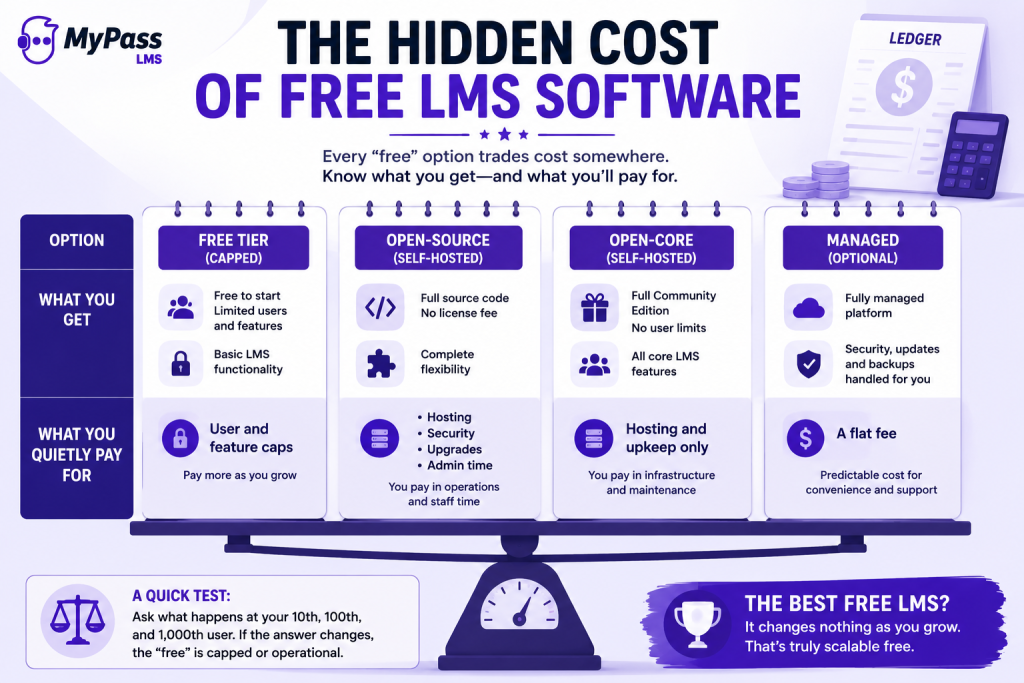
Now the part the pricing pages tend to underplay:
- Free tiers: you pay in caps. The software is free up to a user limit or with certain features locked. Cross the line and you are on a paid plan. This is the most common free LMS software model, and the least suited to growth.
- Open-source: you pay in operations. There is no license fee, but hosting, security patching, version upgrades, plugin vetting and administration are all on you. Industry guides consistently note that self-hosted open-source software shifts cost from licensing to staff time and infrastructure.
- Open-core self-hosted: you pay in hosting only. A full Community Edition core is free with no user cap, and your only real cost is the server and its upkeep, unless you choose the optional managed tier.
| → A quick test for any free LMS software: ask what happens at your tenth user, your hundredth, and your thousandth. If the answer changes, the free is capped. If the answer is you host more, the free is operational. If the answer is nothing changes, you have found genuinely scalable free. |
How to evaluate free LMS software honestly
Put any free option through three questions before you commit:
- What is the real limit? A user cap, a feature gate, or none. This tells you whether the free is temporary or durable.
- Who runs it? You, via self-hosting, or the vendor. This tells you whether you are paying in operations or in money.
- What happens when I grow? The best free LMS software, such as an open-core Community Edition with unlimited users, lets you grow without a per-seat penalty and move to managed hosting only if you choose.
Answer those three and the marketing word free resolves into a concrete trade you can actually evaluate. MyPass LMS Community Edition, for example, is free LMS software with a full core and unlimited users, where the only cost of the free path is self-hosting, and managed hosting is optional rather than inevitable.
The bottom line
Free LMS software is real and can be genuinely capable, but every version trades cost somewhere: in user caps, in operations, or in an optional flat fee. The way to choose well is to look past the word free and ask what the real limit is, who runs it, and what happens when you grow. Do that and you can pick the free LMS software whose trade actually fits your team, rather than discovering the catch after you have committed.
See free LMS software with a full core and unlimited users in MyPass LMS Community Edition, read the complete guide to free LMS options, or start a free trial.
Frequently Asked Questions
Is free LMS software actually free?
It is free of license fees, but never costless. Free tiers trade cost for user or feature caps, open-source software trades it for hosting and maintenance, and open-core self-hosting trades it for server upkeep. Only the trade differs, not the existence of one.
What is the best free LMS software?
The best free LMS software depends on your capacity. Open-source like Moodle suits technical teams, capped free tiers suit tiny teams, and open-core Community Editions like MyPass LMS suit those wanting a full platform with unlimited users and an optional managed path.
Does free LMS software support SCORM?
The stronger free options do. Open-source and open-core Community Editions typically support SCORM, so you can use standardized content you already own. Always confirm SCORM support before choosing, especially with capped free tiers.
Can free LMS software handle unlimited users?
Some can. Open-core Community Editions such as MyPass LMS offer unlimited registered users at no license cost. Capped free tiers do not, since limiting users is how they encourage upgrades. Check the user model before committing.
How do I find the hidden cost of free LMS software?
Ask three questions: what is the real limit (user cap or feature gate), who runs it (you or the vendor), and what happens when you grow. The answers reveal whether you pay in caps, in operations, or in an optional fee.