LMS Pricing Without Per-User Fees: What Flat-Rate Actually Costs
On this page 10 sections
- The Four Ways LMS Vendors Charge You
- One Word in the Contract Can Change the Bill Fivefold
- What Active Actually Means
- What Per-User Pricing Actually Costs
- The Costs That Sit Outside the Per-User Line
- Where Flat Rate Wins, and Where It Does Not
- Six Questions to Put in Writing
- The bottom line
- Frequently asked questions
- Sources
Short answer
Flat-rate LMS pricing charges one price regardless of how many people use the system. Per-user pricing charges per person, but vendors count people differently, and whether they bill registered or active users can change the same organisation's annual bill several times over.
The Four Ways LMS Vendors Charge You
Almost every LMS quote you receive will be one of four shapes. Vendors rarely label them this plainly, so it is worth being able to spot which one you are looking at.
- Per registered user. You pay for every account in the system, whether that person logs in or not. Leavers you have not deleted are still billable.
- Per active user. You pay only for accounts that meet a usage threshold in the billing period. Cheaper on paper, but everything depends on how the vendor defines active.
- Tiered bands. A fixed price for a range of users. TalentLMS, for instance, publishes bands at up to 40, 70 and 100 users. Cross a threshold and you jump a whole tier.
- Flat rate. One price, no per-person component. The cost stops moving when your headcount does not.
The first three all scale with people. That sounds fair until you notice that most organisations have far more accounts than they have regular learners, and the gap between those two numbers is where the bill gets interesting.
One Word in the Contract Can Change the Bill Fivefold
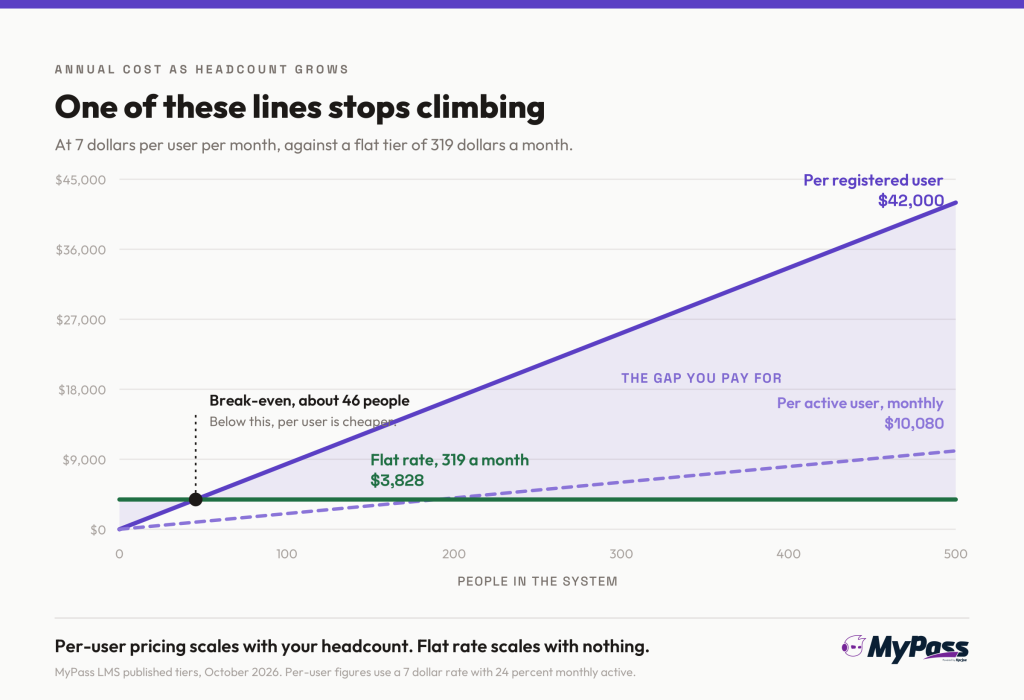
Here is a worked example from a vendor analysis of the two main per-user models. A 500-employee company with 30 percent annual turnover, around 150 leaver accounts still in the system, and roughly 120 people logging in during a typical month, at 7 dollars per user per month.
| What the vendor bills on | Users billed | Annual cost |
| Registered users | 650 (500 staff plus 150 retained leaver accounts) | 54,600 dollars |
| Active users, measured annually | 500 (almost everyone logs in at some point in a year) | 42,000 dollars |
| Active users, measured monthly | About 120 | 10,080 dollars |
Same platform. Same people. Same 7 dollar rate. The bill ranges from roughly 10,000 to nearly 55,000 dollars a year depending entirely on which noun the contract uses and over what period it is measured.
Worth flagging that this example comes from a vendor that sells active-user pricing, so the framing favours their model. The arithmetic is still checkable, and you can run the same sum on your own numbers in about five minutes.
What Active Actually Means
If a vendor quotes you per active user, the definition is the contract. Ask for it in writing, because there are at least three in circulation and they produce very different invoices.
- Logged in at least once. The most buyer-friendly version, and the one most people assume they are getting.
- Was assigned a course. This is close to registered-user billing with a friendlier name, because assignment is something your admin does, not something the learner does.
- Consumed a course or recorded activity. Somewhere in between, and the hardest of the three to forecast.
Then check the period. Annual-active billing sounds generous but ends up close to registered-user billing, because almost everyone logs in at least once in twelve months. Monthly is where the saving actually lives.
One more thing to ask about: compliance spikes. If you run an annual compliance campaign and the whole organisation logs in that month, an active-user contract can bill nearly everybody for that period. Find out how overages and true-ups are handled before you sign.
What Per-User Pricing Actually Costs
Published rates for mid-market platforms sit roughly between 4 and 15 dollars per user per month. Here is where some of the named platforms land, from published pages and reported figures checked in October 2026.
| Platform | Model | Published or reported |
| TalentLMS | Tiered bands on monthly active users | 119 dollars a month up to 40 users, 229 up to 70, 449 up to 100 |
| iSpring Learn | Per active user | Around 6.64 dollars per user at 100 users, around 3.75 at 500 |
| 360Learning | Per user per month | 8 dollars per user up to 100 users, custom quote above that |
| LearnUpon | Per active user, annual contract | Roughly 6 to 9 dollars per user, 100-user minimum |
| Absorb LMS | Quote based, per active learner | Smaller deals reported near 34,000 dollars a year |
| Docebo | Quote based, active users plus modules | Total cost commonly 50,000 dollars a year and up |
| Moodle self-hosted | No licence fee | 0.25 to 1.0 full-time staff to run it, so roughly 19,000 to 76,000 dollars a year in time |
| MyPass LMS (ours) | Flat rate, no per-user component | A free edition, then published tiers at 99 and 319 dollars a month whatever your headcount |
At 500 people, a published per-seat platform typically lands somewhere around 24,000 to 42,000 dollars a year. Our general guide to what an LMS costs covers the wider budget picture, including the parts that have nothing to do with how users are counted.
The Costs That Sit Outside the Per-User Line
The per-user rate is the number in the proposal. It is rarely the number on the invoice.
- Implementation. Often a one-off charge in the four or five figures with enterprise vendors, and usually not in the headline price.
- Content libraries. Third-party course libraries commonly run 15 to 30 dollars per learner per year, charged separately from the platform.
- Features behind tiers. Single sign-on, API access, extra portals and premium support frequently sit on a higher plan rather than being priced as add-ons.
- Minimum commitments. LearnUpon has a 100-user minimum. If you have 60 people, you are paying for 100.
- Renewal uplift. Ask what the cap is. An uncapped renewal clause can undo a good first-year price in year two.
These are the items that turn a comfortable quote into an awkward conversation with finance. Reducing training costs has more on where the money usually goes, and the LMS requirements checklist helps you work out which of these features you genuinely need before a salesperson tells you.
Where Flat Rate Wins, and Where It Does Not
We sell flat rate, so here is the honest version rather than the sales version.
- Flat rate wins when you have many accounts and fewer regular learners. Associations, member bodies, volunteer networks, seasonal workforces and anyone with high turnover. The registered-user model punishes exactly this shape of organisation.
- Flat rate wins when you need predictability. The number does not change when HR onboards thirty people, so you can budget a year out without guessing at headcount.
- Flat rate wins when you want everyone in the system. Per-user pricing quietly discourages adding people, which is a strange incentive for a platform meant to train your whole workforce.
- Per-user wins when your team is small and stable. At 15 people with no turnover, a per-user plan at 6 dollars is about 1,080 dollars a year, and a flat rate will probably cost more.
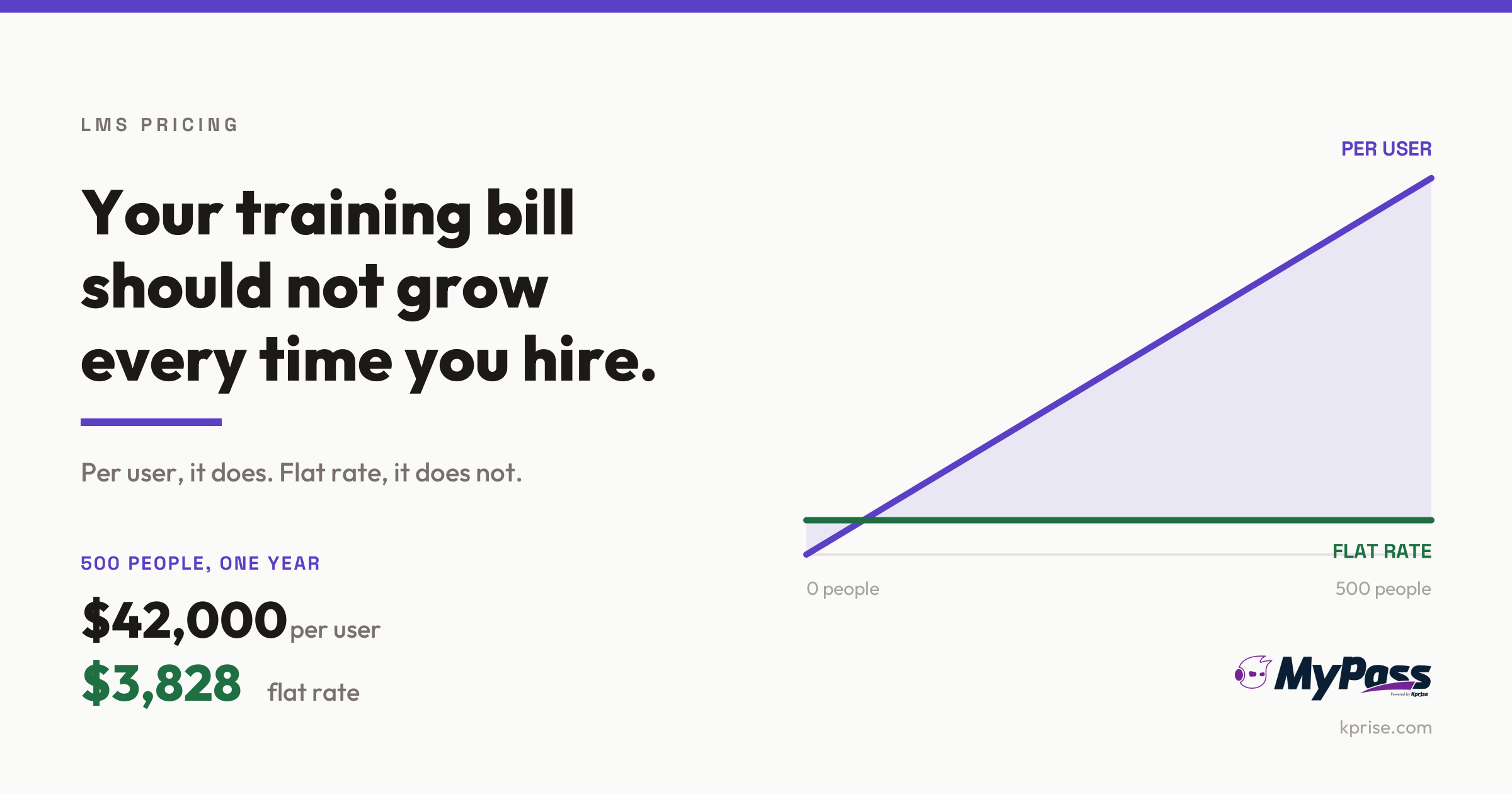
- The break-even is easy to work out. Our top published tier is 319 dollars a month. Against a 7 dollar per registered user contract, that breaks even at about 46 accounts. Below that, per-user is cheaper. Above it, the gap widens every month and never closes.
- Per-user wins when a monthly-active definition genuinely fits. If only a small fraction log in each month and the contract measures monthly, that is a real saving, as the worked example above shows.
To put our own numbers on the table rather than talking about the model in the abstract: MyPass LMS has a free edition with no per-seat charge at all, and published tiers at 99 and 319 dollars a month. Those figures do not move when you add people. At 500 registered users, a 7 dollar per-user contract runs about 42,000 dollars a year. The same 500 people on our top published tier is 3,828 dollars.
The honest summary is still that flat rate is not automatically cheaper. It is more predictable, and it stops being more expensive once your account count outgrows your active learner count. For most organisations with turnover, that point arrives sooner than they expect. We wrote separately about why we do not charge per seat if you want the reasoning in full.
Six Questions to Put in Writing
Email these to every vendor on your shortlist. The ones who answer plainly are usually the ones worth talking to.
1. Is the price per active user or per registered user? If it is active, what is the exact definition, and over what period?
2. Do deactivated, archived or leaver accounts still bill? This is the single biggest driver of the gap in the table above.
3. What happens when we exceed the committed count? Ask for the overage rate and whether a true-up is annual or immediate.
4. What is excluded from this price? Implementation, content, integrations, SSO, extra portals, support.
5. What is the renewal uplift cap? Get a number, not a reassurance.
6. How do we export our courses and records if we leave? Make them show you, rather than describe it.
The 15 questions to ask every LMS vendor covers the non-pricing half of this conversation.
The bottom line
LMS pricing is less about the rate than about what the rate is multiplied by. The same 7 dollars per user can produce a bill of 10,000 dollars or 55,000 dollars for the same organisation, depending on whether the contract counts registered accounts or monthly active ones. Before comparing any two quotes, make them quote on the same basis, or you are comparing nothing at all.
Then look past the per-user line at implementation, content libraries, features sitting on higher tiers, minimum commitments and the renewal clause. That is where comfortable quotes become uncomfortable invoices.
If your organisation has more accounts than regular learners, which is most associations and anywhere with turnover, flat rate is worth putting on the shortlist. MyPass LMS is flat rate throughout: a free edition with no per-seat charge, then published tiers that do not move when you hire. See what the free edition includes.
Frequently asked questions
What is flat-rate LMS pricing?
One price for the platform regardless of how many people use it. There is no per-person component, so adding users does not change the bill. It suits organisations with lots of accounts but fewer regular learners.
What is the difference between active and registered user pricing?
Registered-user pricing bills every account in the system, including leavers you have not deleted. Active-user pricing bills only accounts meeting a usage threshold in the period. The same company can pay several times more under one than the other.
How much does an LMS cost per user?
Published mid-market platforms generally run 4 to 15 dollars per user per month. At 500 people that is roughly 24,000 to 42,000 dollars a year, before implementation, content libraries and features that sit on higher tiers.
Is flat-rate LMS pricing always cheaper?
No. For a small, stable team, per-user pricing is usually cheaper. Against a 7 dollar per registered user contract, a 319 dollar a month flat tier breaks even at roughly 46 accounts. Below that per-user wins; above it the gap widens every month.
Sources
- CompanyLMS analysis of active-user versus registered-user LMS billing, including a worked example for a 500-employee organisation at 7 dollars per user per month. CompanyLMS sells an active-user product, so treat the framing as interested and the arithmetic as checkable.
- Published vendor pricing pages and third-party reported figures for TalentLMS, iSpring Learn, 360Learning, LearnUpon, Absorb LMS, Docebo and MoodleCloud, checked October 2026.
- Reported ranges for LMS implementation fees, third-party content library subscriptions and self-hosted Moodle staffing costs, which vary widely by provider and region.
- Quoted enterprise prices are reported estimates rather than vendor offers. Confirm every figure with the vendor before budgeting against it.
Keep reading
Choosing an LMS
LMS SSO: Single Sign-On and SCIM Provisioning Explained

Choosing an LMS